
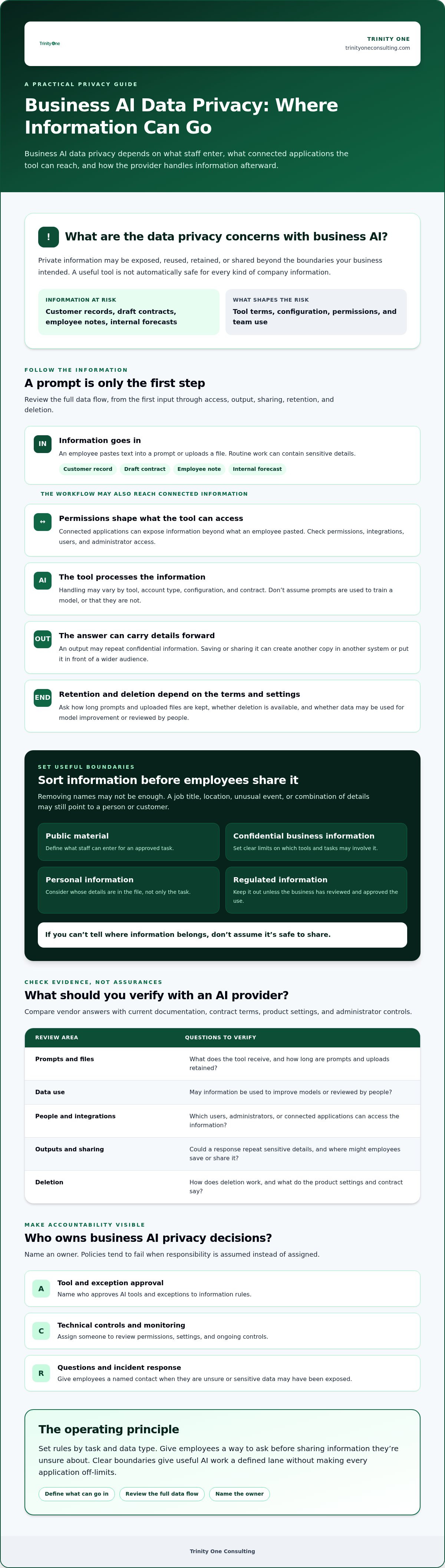
Business AI can expose sensitive information when staff enter it into prompts or upload files, when a provider retains or reuses that data, or when access and outputs aren’t controlled. Those are the core data privacy concerns with business AI. The actual risk depends on the tool’s terms, configuration, and how your team uses it.
A draft contract, customer record, employee note, or internal forecast may look like routine work material until someone pastes it into an AI tool. A tool’s usefulness doesn’t automatically make it safe to share information with.
Before adopting AI, set clear boundaries: what information employees can enter, what must stay out, and who approves exceptions. Ask vendors how prompts and uploaded files are retained, whether data is used to improve models, who can access it, and how deletion works. Verify the answers in current documentation and contract terms, not just in a sales conversation.
Then assign an owner for approval, monitoring, and incident response. Policies tend to fail when ownership is assumed instead of named. Clear accountability gives useful AI work a defined lane without making every application off-limits.
Key Takeaways
- Data privacy concerns with business AI can arise after information is entered, including through processing, outputs, sharing, and retention.
- Check what a tool can access through its permissions and connected applications before using it with company information.
- Compare vendor claims with contract terms, product settings, and administrator controls for data use, retention, access, and deletion.
- Set clear rules by task and data type, and give employees a way to ask before sharing information they’re unsure about.
- Name who approves AI tools, who reviews technical controls, and who employees contact if sensitive data may have been exposed.
What are the data privacy concerns with business AI?
Data privacy concerns with business AI arise when information about your company, customers, or employees is entered into an AI tool, accessed through a connected application, included in an output, or handled in ways your business hasn’t reviewed. The key questions are who can access the information, how it’s used, and what happens to it afterward.
Business AI privacy risk is the chance that information handled by an AI workflow is exposed, reused, retained, or shared beyond the boundaries your business intended. That differs from cybersecurity risk, which focuses on unauthorized access to systems or data. The two can overlap: a security incident can expose private information, while routine AI use can create a privacy concern without a system breach.
What information could employees expose to an AI tool?
An employee might paste a customer record into a prompt, upload a draft contract for review, or ask for help with an unannounced plan. Employee details can also appear in performance notes, schedules, or internal messages. The task may seem ordinary, but the information may be sensitive.
Removing names doesn’t always prevent identification. A job title, location, unusual event, or combination of details may point to a specific person or customer. As a practical first step, sort information into categories such as public material, confidential business information, personal information, and regulated information. If you can’t tell where a file belongs, don’t assume it’s safe to share.
Information privacy covers how information about people is collected and handled. This distinction matters when a work document includes personal details alongside business content. Consider both what the file contains and whose information it includes.
Why does the AI data flow matter?
Trace information from the moment an employee enters a prompt or uploads a file. The tool processes it to produce an answer and may retain it, make it available for review, or handle it according to deletion settings. Details vary by tool, account type, configuration, and contract. Don’t assume prompts are used to train a model, or that they aren’t. Check current vendor terms and settings.
The flow may extend beyond the AI tool. If an application is connected, its permissions can affect which company information the AI workflow can reach. Outputs matter, too. An answer that repeats confidential details creates another copy when someone saves or shares it.
Review the whole path, not just the prompt box: what goes in, what the tool can access, where results go, and how retention and deletion work. A blanket ban on all business information may reduce exposure, but it can also block useful work. Clear boundaries give employees a more practical guide than guesswork.
How can business AI create privacy risks after someone enters data?
Data privacy concerns with business AI can continue after an employee submits a prompt or file. Information moves through a chain: the tool receives it, processes it, produces an output, and may retain or make it available according to its settings and terms. If an application is connected, the workflow may also reach information the employee didn’t paste into the prompt.
A privacy review should cover the full data flow, from the first input through access, output, sharing, retention, and deletion. Checking only the prompt box leaves access and later copies unexamined.
What should leaders ask about prompts, files, and retention?
Start by identifying what the tool receives. Does it handle only the prompt and uploaded file, or can it also access information through a connected application? Which users, integrations, or administrators can view that information? The answers may depend on permissions, account type, and the settings your organization has enabled.
Next, check current vendor documentation and contract terms. Ask how long prompts and files are retained, whether deletion is available, and whether data may be used for model improvement or reviewed by people. Don’t rely on a general product description when details may differ by account or configuration.
How can AI outputs create a second privacy problem?
An output can repeat sensitive details from the material provided. It can also summarize them in a way that seems safe to share, even when the summary still identifies someone or reveals internal information. If an employee copies the response into a shared document or sends it to a customer, the information has moved into another system and may reach a wider audience.
Set a human review step before using AI-generated content in consequential decisions or external communications. The reviewer should check whether the output includes private details, whether the facts are accurate, and whether the intended audience should receive it. Review takes time and can slow routine work, but skipping it means there’s no deliberate check before sensitive information travels further. Human-in-the-loop automation practices offer useful context for keeping people involved in those reviews.
Assign someone to verify how each approved workflow handles inputs and outputs, not just whether the tool has been approved. A permission change or new connection can alter what information the workflow reaches. Review settings when the workflow changes, and make sure employees know where to raise a concern before sharing questionable material.
How should you compare AI tools before sharing business data?
Compare each tool’s data practices, not just its plan name or a reassuring privacy label. For data privacy concerns with business AI, ask what happens to company information under the specific account, settings, and contract your team will use.
Compare documented data practices, not privacy claims in isolation. A general privacy statement or feature label doesn’t prove that a specific safeguard applies to your account. Ask for information you can verify, then record where it came from.
Which vendor questions deserve a written answer?
Use a comparison sheet with a row for each area below. Record the vendor’s answer, its source, and the date you checked it. Verify the answer against current contract terms, product settings, and administrator controls.
- Data use: Is submitted information retained, reviewed by people, or used for model improvement?
- Retention and deletion: How long are prompts and files kept, and what deletion options apply?
- Access: Which account users or administrators can view submitted information?
- Incident notices: How does the vendor notify customers about a security incident involving their data?
- Accountability: Who in your business owns approval and ongoing review of the tool?
If a salesperson answers a question, ask where the same answer appears in current documentation or contract terms. A verbal assurance isn’t the same as an enforceable term, and a setting you haven’t checked isn’t a control you can count on.
How do you choose between public, team, and enterprise tools?
Don’t assume a tier name guarantees a particular level of privacy. Compare the terms and controls attached to the exact account you’re considering. A higher tier may have different settings or contractual terms, but verify the details instead of relying on its label.
Match access to the task. A workflow using public information may need fewer restrictions than one involving confidential plans or personal details. Limiting access can reduce exposure, but it can also make a tool less useful for work that depends on shared company context. Set the boundary based on the information and business purpose, then document who approved it.
Include fair and appropriate use alongside data handling when comparing options. Your review should leave the team with a documented decision about what work the account is approved to handle.
What practical controls can a business set before employees use AI?
Practical controls for data privacy concerns with business AI begin with decisions employees can apply to real tasks. Set a clear process before staff begin, then name a business owner to keep the rules current, review tools, and handle exceptions.
How can leaders set a clear AI data policy?
Build the policy around five actions. Make it specific enough that an employee can decide what to do with a real document, rather than relying on a general warning about sensitive information.
- Classify information. Mark which data is public, confidential, personal, or regulated, and state which categories must not go into AI tools.
- Approve tools. Identify the tools and account types employees may use for company work. Don’t assume an account’s tier name tells you how its data is handled.
- Set task rules. Specify permitted uses, such as drafting from approved public material, and prohibited uses, such as entering restricted records into an unapproved tool.
- Train employees. Show staff how to check a file before sharing it, and give them a named contact when they’re unsure. AI tool training for employees can support practical staff guidance.
- Review use. Assign a business owner to review tool terms, update the policy when workflows or vendor terms change, and decide exceptions with appropriate technical or legal input.
Make the escalation path plain: “If you can’t confirm that the information is allowed, pause and ask.” A strict ban may reduce exposure, but it can also block useful work and encourage employees to find workarounds. A clear route for questions gives them a safer next step without expecting everyone to interpret vendor terms.
How should teams test and review the controls?
Start with one low-sensitivity workflow. Record what information goes in, what the tool can access, and what leaves in the output. Then ask the employees doing the task where the instructions fit and where they get in the way.
If a rule conflicts with the work, revise the rule or change the workflow. Don’t leave staff to resolve that conflict alone. Keep the approved steps in a shared, maintained document, and review them when the tool, task, or vendor terms change. A documented workflow guide can make ownership and steps visible, but it doesn’t replace checking the tool’s actual settings.
Book a discovery call with Kevin
Who should own business AI privacy decisions and what comes next?
Data privacy concerns with business AI require named owners, not just a policy sitting unread in a shared folder. Executives set boundaries and accept business accountability. Technical specialists check how tools are configured and connected—and for organizations building or integrating custom software, engineering partners like The Code Factory can assist with production readiness reviews and code remediation. Qualified counsel advises on legal and contractual questions, while employees follow approved rules and raise concerns when a task falls outside them.
Write down who can approve a tool, who can approve a new use, and who decides whether an exception is acceptable. Document where employees report a suspected exposure, who receives the report, and who coordinates the next steps. If everyone assumes someone else owns the decision, the response can stall when it matters.
When should a company bring in legal or technical review?
Ask qualified counsel to assess applicable obligations when a proposed use may involve personal, regulated, or contract-restricted information. This article is educational, not legal advice or a determination that your business meets any particular requirement.
Bring in technical specialists when a workflow connects to company applications or depends on specific access settings. Ask them to inspect which systems and information the AI tool can reach, how access is configured, and what changes when the workflow is updated. Business leaders still own the approval decision. Technical review informs it. For accounting and tax practices looking to align their technology workflows with formal security plans, check out Apex Tech 4 Tax Pros.
Put AI use on an existing leadership or operating meeting agenda. Record the accountable owner, approved uses, open exceptions, and when each workflow should be reviewed again. Revisit those items when a vendor changes its terms, a tool gains a new connection, or employees report that a rule doesn’t fit the work.
A recurring review makes ownership visible, but it doesn’t prove that information is protected. It also takes meeting time, so focus the discussion on decisions and changes rather than reading the policy aloud. Trinity Cadence provides a unified operating cadence, AI coaching, and real-time visibility into execution and engagement. Those capabilities can help teams keep ownership and follow-through visible, but they don’t replace technical review or privacy controls. A fractional COO and Integrator can help clarify operational ownership and connect agreed practices to how the business runs.
Use the meeting to surface real friction. If employees repeatedly ask whether a task is allowed, the instruction may need to be clearer, or the workflow may need a different boundary. That feedback helps your team improve its judgment instead of relying on guesswork.
Schedule a discovery call with Kevin to discuss AI oversight in your business.
Put clear ownership behind your AI practices
Data privacy concerns with business AI are easier to manage when decisions have an owner and employees understand the boundaries. Check what information a tool handles, compare its documented terms and settings with the intended work, and give staff a clear path to ask before sharing information they’re unsure about.
Keep oversight in the operating rhythm. Review approved uses and exceptions when tools, workflows, or vendor terms change. A regular cadence can keep responsibilities visible, but it doesn’t secure data by itself. Technical review and qualified legal advice still have a role.
Trinity One provides AI implementation and fractional COO or Integrator support to help businesses put operating practices into action. Trinity Cadence offers a unified operating cadence, AI coaching, and real-time visibility into execution and engagement. These services can support clearer ownership and follow-through; they don’t replace review of a tool’s privacy terms, settings, or access controls.
Start with one workflow, make the rules usable, and help your team build sound judgment as the work changes.
Frequently Asked Questions
Can employees enter customer data into business AI tools?
Employees should enter customer data only into a tool and workflow your business has approved for that information. Check current terms and account settings to understand how data is handled, including retention and access. If a record contains personal or contract-restricted details and you can’t confirm the boundaries, don’t submit it. Ask the person responsible for AI approvals before proceeding.
Is business AI private by default?
No. Don’t assume an AI tool keeps business information private because it’s paid, intended for work, or described as secure. Data practices can vary by tool, account type, settings, and contract. Verify what applies to the account your team will use, including who can access submitted information and how long it may be retained. A plan name or feature label isn’t proof of a specific safeguard.
What happens to data entered into an AI tool?
The tool receives and processes the prompt or file to produce an output. Depending on its terms and configuration, information may also be retained, made available for review, or handled under particular deletion settings. Connected applications can affect what the workflow can access, and outputs may carry details into other documents or messages. Check current vendor documentation instead of assuming prompts train a model or are immediately deleted.
How can a small business reduce AI data privacy risks?
Start by sorting information into clear categories, such as public, confidential, personal, or restricted. Approve specific tools and tasks, then give employees a simple rule for information that must stay out. Train staff with examples from their actual work and name someone they can ask before sharing uncertain material. Test one low-sensitivity workflow first, then review what enters and leaves before expanding its use.
Can business AI reveal personal information in its answers?
Yes. An AI output may repeat or summarize personal details supplied in a prompt or file. It may also combine context in a way that points to a person, even if a name was removed. Review outputs before adding them to shared documents or sending them externally. Check for identifying details, confirm the content is appropriate for its audience, and limit access to the resulting document.
Who is responsible for AI privacy in a company?
Company leadership should assign a business owner for AI approvals and policy updates. Technical specialists review settings, integrations, and access paths. Qualified counsel can advise when personal, regulated, or contract-restricted information is involved. Employees are responsible for following the rules and raising concerns when a task falls outside them. Write down approval boundaries and who receives a report if someone suspects information was exposed.