
A polished AI demo can make a team look ready while the work stays exactly the same. Training employees to use AI tools effectively starts with a task people already do, such as turning meeting notes into a client update. Employees then practise checking the draft before it’s sent.
Uneven use usually has a practical cause. One employee is experimenting, another is avoiding the tool, and a manager can’t tell whether the output saved time or created more editing. A general software tour won’t fix that gap.
Treat training as an operating practice, not a one-time demonstration. Employees need to practise on real work, know what information belongs in an approved tool, and understand which decisions still need human review. The tradeoff is time away from routine work. The benefit is a clearer standard for using AI without handing over judgment.
Start with one workflow and define what good work looks like before AI enters it. Give an employee ownership of the process, set a review point, and track whether the task takes less time without adding rework. This creates repeatable skills, visible accountability, and a grounded way to decide what to teach next.
Key Takeaways
- Training employees to use AI tools effectively means building task skills, review habits, and clear ownership through repeated practice at work.
- Choose a familiar workflow, then guide employees through using AI and checking its output. Treat examples as illustrative, not proof of a result.
- A software demonstration can introduce a tool, but it won’t fix unclear processes or review expectations. Coached practice takes more manager time and connects learning to real work.
- Give a manager or workflow owner responsibility for questions and recurring issues, then adjust the training as the task changes.
- Use recurring check-ins to surface workflow obstacles. Judge progress by changes in work quality or execution, not tool activity alone.
What Does Training Employees to Use AI Tools Effectively Require?
Effective training builds task skills, review habits, and clear ownership. Training employees to use AI tools effectively means practising those skills within real work, not attending a single software walkthrough and being left to figure out the rest.
Tool access alone doesn’t establish safe, useful habits. An employee may get a plausible answer without knowing whether it matches the source material, meets business requirements, or includes information that shouldn’t be entered into the tool. Someone also needs to own questions and decide when a person should check uncertain work.
AI fluency means knowing how to direct a tool, test its output, and take responsibility for what happens next. Unsupervised AI output is text or analysis produced without a person checking whether it’s accurate or fit for use. The distinction matters. Corporate education treats learning as a system of professional development, not a one-off software event.
What should employees learn before using AI at work?
Start with the task. Employees should be able to describe what they need done, provide relevant context, and specify the form a useful answer should take. For example, an employee preparing a project update could ask for a concise draft based on approved notes, with open decisions clearly marked.
Then teach verification. The employee compares the draft with the original notes and business requirements, corrects unsupported details, and checks that the language says what the team means. Set a clear boundary for confidential information, too. If an employee can’t confirm whether information belongs in the tool, they should stop and ask the designated manager or workflow owner.
Why does training need to connect to real work?
Choose a familiar, repeatable task where employees can compare the current method with an AI-assisted one. For example, an analyst could draft an explanation of a monthly spreadsheet variance, check every figure against the source, and confirm the explanation follows the company’s reporting definitions. The test is whether the work meets the same standard with less avoidable effort, not whether the tool can produce a fluent paragraph.
Keep practice role-specific. A generic demonstration can show where buttons are, but it can’t teach an analyst how to check figures or a manager how to review a decision brief. As you move from spreadsheets toward an operating system, the work, ownership, and review steps need to connect. Repeated practice takes time away from immediate output, but a quick demo is poor at building judgment employees can apply when the prompt or answer changes.
How Can You Teach Employees to Use AI in Their Daily Work?
Teach employees through a short sequence: choose recurring work, record how it’s done now, set boundaries, practise with supervision, then review the result. Training employees to use AI tools effectively takes time from regular work, so focus that time on tasks employees repeat and can check against a clear standard.
How do you choose a useful first task?
Ask a team to identify work with familiar inputs and an output someone can review. Avoid starting with confidential material, sensitive decisions, or tasks where no one can describe an acceptable result. Those are poor training tasks because errors are harder to spot and the cost of correction may be higher.
Before introducing AI, note the existing steps, typical time, and where corrections happen. That gives the team a fair comparison. Without a baseline, a faster first draft can look like progress even if it creates more review work later.
How should employees practise prompting and review?
Use an illustrative workflow: an operations coordinator drafts an internal handoff checklist from approved work notes. The employee states the task, names the audience, provides permitted source context, and describes the required format. A coach watches the first attempts and asks the employee to explain what they would verify before sharing the draft.
Review each output for factual claims, tone, missing steps, and fit with the task. If the draft misses the mark, refine the instruction rather than accepting weak work. For example: “Use only the approved notes. Keep the checklist in the order the next person will perform the work. Flag anything the notes don’t answer.” Then check the revision against the original source.
The coach or an experienced colleague should discuss corrections and judgment calls during practice. That takes time away from other responsibilities, so it’s a poor use of time for work employees rarely perform. Focus on recurring tasks, record what changed, and keep a person accountable for the final output.
Can AI Training Alone Change How Your Team Works?
No. Training employees to use AI tools effectively can’t repair a process with unclear ownership, missing review steps, or conflicting expectations. Training is one part of the operating system. If the work itself is poorly defined, AI can produce a faster version of the same confusion.
Each training format has a place, and each has a cost. A workshop takes people away from their work. Self-paced materials shift the learning burden to employees and can leave questions unresolved. Coached practice asks managers or experienced colleagues to spend time reviewing real work, but it gives them a chance to correct habits in context.
| Approach | Best use | Limitation | Follow-up required |
|---|---|---|---|
| One-time demonstration | Introducing shared basics and showing where to ask questions | Often too brief to change habits once employees return to daily work | Practise a real task and check how employees review the output |
| Self-paced materials | Letting employees revisit instructions as needed | Can’t reliably answer role-specific questions or confirm understanding | Make time for questions and check the material against actual workflows |
| Coached workflow practice | Teaching employees to apply AI and review its output in a specific task | Uses manager and employee time, and takes longer to extend across teams | Review corrections, clarify ownership, and update the process when needed |
When does a workshop help, and where does it fall short?
A workshop can give a team common language and let employees raise questions together. That’s useful groundwork, but one session can’t establish a habit by itself. Once people return to their desks, deadlines and old routines take over unless they practise with actual tasks and receive manager feedback.
Keep the workshop focused on shared basics, then schedule follow-up around the work employees actually do. The tradeoff is time away from immediate tasks. A demonstration is also a poor substitute for coaching when employees need to learn how to handle an uncertain or incomplete answer.
What belongs in human review of AI-assisted work?
The employee responsible for the final work product remains accountable for it. They should check whether the output is supported by its source, fits the intended audience, and meets the business requirement. Review should be closer when an error could affect a customer, company finances, or a commitment the business has made. For customer-facing teams deploying omnichannel automation through GraiaCX, this means training agents to actively monitor and verify AI-generated communications across voice, chat, and email.
Set expectations for handling confidential information before employees use AI in a workflow. Your separate article on data privacy concerns with business AI can support that discussion, while the team agrees on what information is appropriate to enter and who to ask when the answer is unclear.
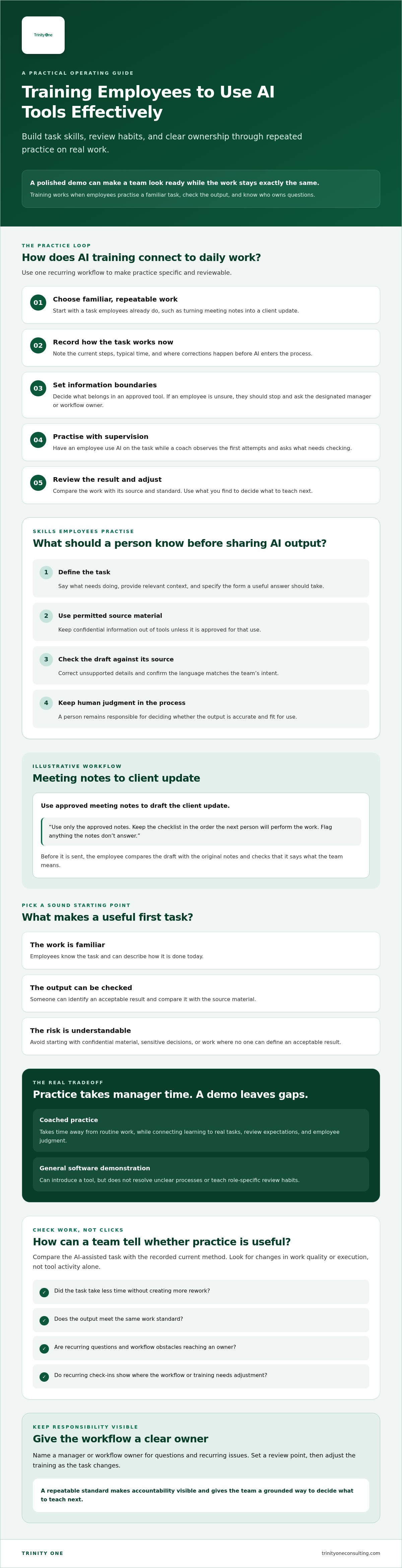
How Do You Build an AI Training Plan Employees Can Use?
Training employees to use AI tools effectively needs a plan tied to a real task and a named owner. Use this sequence: select a task, set boundaries, practise, review the work, then adjust the process. Keep the steps visible so employees know what to do when the output is wrong or the situation changes.
- Select a task. Choose repeatable work with clear inputs and a standard for acceptable output.
- Set boundaries. Document which tools employees may use for the task and what information must stay out of them.
- Practise. Have employees work through the task with guidance from a manager or workflow owner.
- Review. Check the output against source information and business requirements before it’s used.
- Adjust. Record recurring errors or questions, then update the instructions, review steps, or task definition.
Assign one manager or workflow owner to answer questions and collect recurring issues. Without an owner, employees can receive conflicting answers or quietly make up their own rules. That may feel quicker at first, but it makes consistent practice harder. For teams needing external human resources support to structure workplace policies and manager oversight, read more about comprehensive HR management services.
How should you set boundaries before training begins?
Write down which tools employees may use for the task and what information they must not enter. Define when an employee should verify, edit, reject, or escalate an AI response. Clear boundaries take time to agree on, but vague instructions leave employees guessing about acceptable use.
Connect your measures to the return you expect from AI implementation. A count of prompts or tool logins shows activity. It doesn’t show that the work improved.
How can managers reinforce learning after practice?
Use an existing team meeting to review a work example instead of creating another reporting requirement. Ask employees to point out where an AI response needed substantial correction. Then decide whether the issue calls for clearer instructions, a named task owner, or a different review step.
Track measures that fit the task, such as output quality, rework, completion steps, and employee confidence where relevant. Compare them with a baseline recorded before training. Don’t claim a productivity gain without evidence that the work changed. Extra tracking can become busywork if nobody uses it to make a decision.
How Can Leaders Make AI Training Part of Daily Operations?
Training employees to use AI tools effectively lasts when leaders make practice part of the work rhythm. Use recurring check-ins to surface obstacles, clarify decisions, and agree on workflow changes. Keep a person accountable for the final work. Software settings can’t assign ownership or build employee judgment.
Review a recent work example during a check-in. Ask what needed correction, whether the review step caught the issue, and who owns the next decision. Focus on evidence from the work, not a count of prompts or tool logins.
Separate activity from evidence. More frequent tool use doesn’t prove that work quality or execution changed. Compare results with a defined baseline, including any extra correction or review work. If the evidence isn’t there, don’t claim a gain.
When might outside operational support help?
Outside support may help if no one can identify who owns a workflow, teams are using disconnected processes, or an AI implementation has stalled between planning and daily use. Fractional COO and Integrator support can bring operational experience to clarifying priorities and ownership. It still requires leadership time and employee participation. Outside expertise can’t make those decisions or build habits on the team’s behalf.
How can an operating cadence support continued learning?
Set a recurring point to review execution, engagement, and workflow changes employees need. Trinity Cadence combines an operating cadence, AI coaching, and visibility into execution and engagement. These capabilities can support ongoing attention to how the work is done. They don’t replace an agreed review standard or human accountability.
As you consider moving from spreadsheets to an operating system, keep the focus on how people carry out and review work. The operating rhythm should give employees a clear place to raise problems and leaders a way to decide what changes.
How Can You Make AI Practice Part of the Work?
Training employees to use AI tools effectively takes more than access and a demonstration. Start with a recurring task, give employees a clear way to check the output, and assign someone to resolve questions. Then review the work against a baseline before claiming a gain.
Keep a person accountable for the final result. AI can help produce a draft or organize information, but employees still need to question errors, protect trust, and make sound decisions. Training works best when leaders make room for practice and treat employee growth as part of how the business operates.
Trinity One’s practitioners bring over 30 years of operational experience. Trinity Cadence combines an operating cadence, AI coaching, and visibility into execution and engagement. These are supports for the work, not a promise of a particular result.
Book a discovery call to discuss your team’s AI training and operating needs
Frequently Asked Questions
How do you train employees to use AI tools effectively?
Start with a recurring task employees already understand, then practise within that workflow. Training employees to use AI tools effectively means showing people how to give the tool relevant context, define the needed output, and check the response before using it. Set rules for sensitive information and work that requires human judgment. Have a manager or workflow owner collect questions, check follow-through, and adjust instructions when the task changes.
What should employees learn first when using AI at work?
Begin with the task, not a tour of tool features. Employees should state the outcome they need, provide context that belongs in the tool, and explain what a usable response looks like for their role. Then they can check whether the answer is accurate and complete enough for its intended use. Each team also needs a clear rule for confidential information and a defined point where a person must make the call.
Can AI training improve productivity on its own?
Training can build practical skills, but it can’t improve productivity by itself. If the process has no clear owner or review standard, employees may spend time correcting AI output without changing the work. Choose a workflow and record its current steps and quality before training. After practice, compare the same measures and include added review or rework. Claim gains only when observed evidence supports them.
How often should employees receive AI training?
Set the cadence based on the work, not a calendar quota. A one-time introduction can cover basics, but employees need practice again when a workflow changes or new questions appear. Use existing team check-ins to review a real output, discuss errors, and clarify a decision employees weren’t sure how to make. Don’t schedule sessions just to show activity. Add training when a real change leaves employees unsure how to proceed.
What should employees avoid entering into AI tools?
Set the boundary before practice begins. Identify confidential, personal, customer, or otherwise restricted information your organization doesn’t permit employees to enter. Rules depend on your tools and internal policies, so confirm them with the people responsible for security and privacy. Use approved examples or remove sensitive details during training, and tell employees where to ask when unsure. Your separate AI privacy guidance can provide more context.
How can a business measure whether AI training is working?
Measure a specific workflow against a baseline recorded before training. Choose evidence that fits the task, such as whether required steps were completed and how much correction the output needed. You can also review quality or employee confidence if those measures matter to the work. Discuss findings with employees and managers, including any extra review burden or errors. Logins and prompt counts show tool activity, not better execution.