
Ethical Considerations of AI in Business Operations
An AI-assisted hiring screen can reject a qualified applicant before anyone on your team reviews the file. The ethical considerations of AI in business operations begin with clear ownership and careful handling of the information a system receives. When AI influences a decision, someone on your team should be able to question its output and take responsibility for what happens next.
The pressure to adopt AI is real. A tool that drafts customer replies may save time on routine messages, yet it could expose customer details or produce a confident answer that staff haven’t checked. Removing AI entirely can cost time. Deploying it without boundaries can cost trust. Both tradeoffs belong in the decision.
Treat AI as an operating choice, not a shortcut around leadership. Start by identifying where an error could harm someone. Then assign a person to review consequential outputs and own the final decision. Match safeguards to the level of risk. This gives you a practical way to use AI while keeping employee trust in view.
Key Takeaways
- The ethical considerations of AI in business operations include privacy, bias, transparency, and clear accountability for decisions.
- Trace each AI-supported workflow from the data entered to the final business consequence to spot where errors or assumptions could cause harm.
- Test three common beliefs: AI can be neutral, human review always catches problems, and a written policy is enough.
- Before adopting a tool, define its task, map the data it uses, assess who could be affected, assign a reviewer, and monitor results.
- Build AI safeguards into existing work meetings and clarify how AI may affect task assignments or employee evaluations.
What are the ethical considerations of AI in business operations?
The ethical considerations of AI in business operations are the choices and controls that shape how AI is used and how its outputs affect people. They include privacy, bias, transparency, and accountability. A useful working definition is this: Responsible AI use means setting boundaries for a tool and naming the person accountable for its effects.
Ethical responsibility and legal compliance overlap, but they aren’t the same. A practice can damage employee or customer trust even if you haven’t established that it violates a law. Legal requirements vary by jurisdiction and use case, so verify any legal claim with a qualified source before acting on it. For a broader overview of the concepts, see Ethics of artificial intelligence.
Which ethical risks can show up in ordinary workflows?
Ethical risks can enter routine tasks. An AI tool might screen applicants, draft a customer support reply, prepare an internal report, or contribute to a performance decision. If its source data is incomplete or reflects past patterns, the output may misrepresent people unevenly. That can be hard to spot when a polished result looks authoritative.
Match oversight to the potential impact. A draft that an employee checks before sending is different from a recommendation that affects someone’s access, opportunity, or treatment. The first may call for a routine check. The second needs a named decision owner who can inspect the basis for the output, question it, and reject it. More review takes staff time, but less oversight can leave someone facing a decision no one can explain.
Why does responsibility stay with the business?
Buying a system or configuring its settings doesn’t assign accountability. Your business chooses where to use it, what information to provide, and how much weight people give its output. The human decision-maker remains responsible for the business decision, even when the tool did much of the analysis.
Name an owner for every AI-supported workflow. Ask: Who checks the result? Who can stop the process? Who responds when someone challenges an outcome? If those answers are unclear, improve the workflow before relying on it. Documented ownership is part of sound operating practice, including for a business moving from spreadsheets toward an operating system. A fractional COO can be relevant when you need clearer operational ownership across workflows.
How do AI ethics risks develop inside a business process?
AI risk can build one handoff at a time. Imagine a service team entering a customer’s message and account notes into an AI tool. The system labels the case as routine, a staff member uses that label to set the response order, and the customer waits longer because an important detail was missing from the original notes.
AI risk depends on the use case, the data, and the impact of the decision. A drafting tool used to polish an internal update has a different risk profile from a system whose recommendation changes how quickly a customer receives help.
Where can privacy and data exposure enter the workflow?
Exposure can begin with what an employee types or uploads. A prompt may include a customer’s account details, an employee’s notes, or information copied from an internal report. Before sharing sensitive information, check who can access it, whether the tool retains it, what its terms say, and which internal data rules apply.
Don’t assume every AI tool handles information the same way. If you can’t confirm where the information goes or who may see it, keep sensitive details out until you’ve checked. That extra step takes time. Skipping it could expose information beyond the people who need it for the task.
How can bias and weak explanations affect decisions?
Data quality shapes what a system produces. If past records reflect uneven treatment, an AI-generated summary or recommendation can carry those patterns into a new decision. For example, a manager reviewing an AI-assisted workload report may see an incomplete picture if some employees’ work is recorded in greater detail than others.
Ask what information shaped the output and whether the decision-maker can explain why it supports the action they’re considering. A fluent answer isn’t proof that the reasoning is sound. If the explanation is unclear, review the recommendation more closely before it affects someone’s work or treatment.
Human review only works when the reviewer has the authority to question, reject, and escalate an output. A person who must accept the recommendation without time or permission to challenge it is a checkpoint on paper, not a meaningful control. More review can slow the workflow. Less review can leave errors unchecked and affect employees or customers who had no chance to correct the underlying information.
The ethical considerations of AI in business operations show up in the handoffs, not only in a tool’s settings. Look at what staff enter, what the system returns, who acts on that result, and what happens to the person affected. That’s where you can see whether the process protects people or simply moves work along.
Which common beliefs about ethical AI should leaders question?
The ethical considerations of AI in business operations become clearer when you test common assumptions against the work people actually do. Safeguards can reduce exposure, but none can guarantee a fair result or remove the need for accountable decisions.
Myth: AI is neutral because it follows data. Reality: A system can reflect patterns in its training or business data. If past records contain gaps or uneven judgments, an AI recommendation may carry those problems into a new decision. A tool can process information consistently and still produce an outcome that deserves to be questioned.
Myth: Human review makes every decision safe. Reality: A reviewer needs enough context and time to assess an output, as well as permission to disagree. If a manager approves a recommendation under pressure without checking its basis, human review becomes a rubber stamp.
Does human review automatically make an AI decision fair?
No. Give reviewers the authority to question or reject a recommendation and a clear route to escalate concerns. When someone overrides an output, record the reason. If similar overrides keep appearing, investigate the pattern rather than treating each case as an isolated judgment.
That work takes time. Reducing review may keep a queue moving, but it can also allow a flawed recommendation to affect an employee or customer before anyone catches the problem. Set review effort according to the decision’s impact, not the tool’s apparent confidence.
Myth: A written AI policy solves the risk. Reality: A policy can set expectations, but it can’t decide who checks a specific output during a busy shift. Staff need practical instructions within the workflow: which uses are approved, who owns the decision, and where to report a concern.
Is an AI policy enough to protect employees and customers?
Not on its own. A policy that names no workflow owner or reporting route leaves staff guessing when an AI response looks wrong. Build the instructions into the steps people already follow, then make sure the assigned owner can act on concerns. This takes time to maintain. A policy alone is unlikely to catch a problem in the moment.
Responsible review adds work. That’s a real operating cost, especially when each output needs individual attention. But unmanaged errors can lead to rework, delayed service, or decisions that damage trust. Make the review burden visible and proportionate rather than pretending either choice is free.
How can you assess ethical risks before using AI at work?
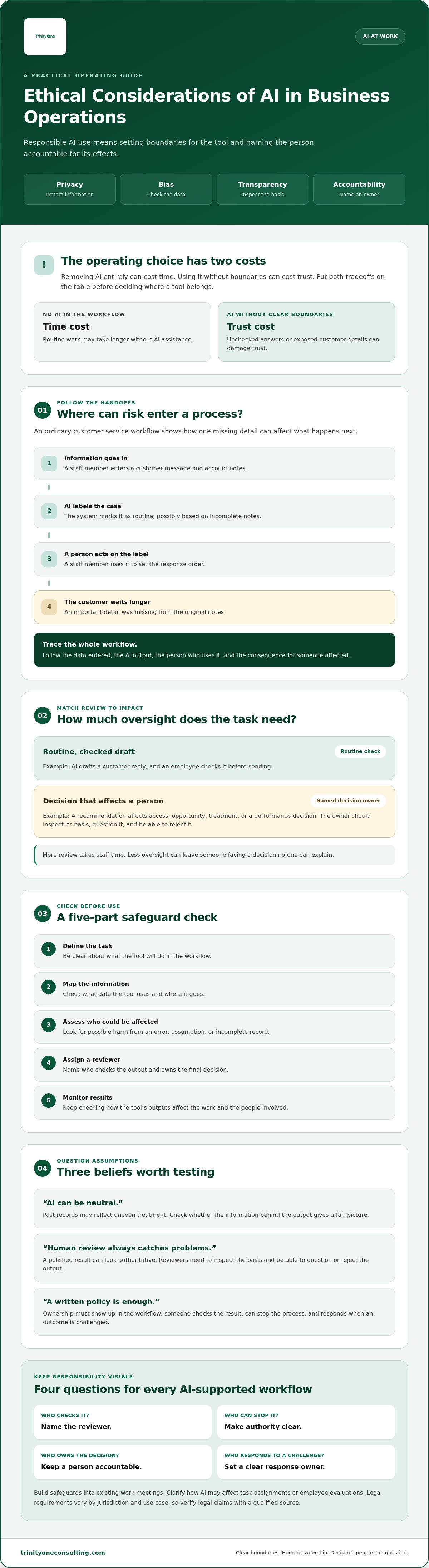
The ethical considerations of AI in business operations call for a practical test before a tool enters live work. Use five steps: define the task, map the data, assess the impact, assign review, and monitor results. Keep the first test small, document who owns it, and set a date to review what happened before expanding its use.
- Define the task. State what the AI tool will do and what it must not do. Who will rely on the result? What could go wrong if the task is misunderstood? Who can stop the process?
- Map the data. List the information staff will enter and where it comes from. Whose information is involved? What happens if it’s inaccurate or sensitive? Who can pause use if the data shouldn’t be shared?
- Assess the impact. Identify who could be affected by an error and what the consequence might be. Could an incorrect output change a person’s access, opportunity, or treatment? Who has the authority to halt the workflow?
- Assign review. Name the person who checks outputs and the owner accountable for the workflow. Can the reviewer question the result, reject it, or escalate a concern? If not, the review step exists on paper only.
- Monitor results. Decide what feedback or error reports the owner will check during the test. What change would make the process unsafe to continue, and who can pause it?
The greater the potential impact on a person, the stronger the human oversight should be. Applying the same review to every task can waste staff time on low-impact work while leaving high-impact decisions under-checked. Set review effort according to what an error could mean for the people affected.
What should an AI use-case assessment record?
Keep a short record of the task’s purpose, input data, affected groups, expected benefit, and known limitations. Name the decision owner and reviewer, explain how staff can escalate a concern, and write down the conditions for pausing the test.
Record the tradeoff, too. Staff time spent checking outputs may slow a process, while an unchecked error can create rework or harm someone affected by a decision. A small test can show whether the expected benefit justifies the review effort. It can’t prove the system will behave the same way in every situation.
How should leaders monitor an AI workflow after launch?
Review error reports and staff feedback, especially when the task or source data changes. Set a review cadence that fits the workflow’s impact and pace, then document what you find and whether use should continue. Prepare employees to spot unreliable outputs and raise concerns. Training takes time, but without it, staff may rely on results they don’t know how to check.
How can leaders make ethical AI part of daily operations?
The ethical considerations of AI in business operations belong in the meetings and decisions where work is already managed. Treat oversight as part of the workflow, not a one-time approval. When a team reviews an AI-assisted customer response, for example, include exceptions, staff concerns, and any output that couldn’t be explained or corrected in the discussion.
Clear communication matters when AI changes how work is assigned or evaluated. Tell employees what role the tool plays, what information informs its output, and who makes the final decision. If the process changes, explain what changed and how staff can raise a concern. Silence leaves people guessing whether a tool is advising a manager or effectively making the call.
How can a leadership team assign AI oversight?
Put three responsibilities in writing: who approves a use case, who monitors its outputs, and who responds when someone reports harm. Review exceptions and unresolved decisions in a recurring operating discussion. Assign an owner to each follow-up so a concern doesn’t disappear between meetings. This takes time, but without an owner an issue can sit untouched.
For a business that needs clearer responsibility across its operating workflows, a fractional COO can help establish ownership and operating cadence. The role should make decision rights visible, not replace the judgment of the people accountable for each workflow.
How can leaders keep AI adoption connected to people?
Ask employees where AI changes their workload, their judgment, or their ability to explain their work. Treat what they report as operational evidence. Record what leaders change, and what they decide not to change, with the reason. Gathering feedback costs staff and manager time, and it won’t resolve every disagreement. It can reveal friction that a dashboard may miss.
Responsible adoption is ongoing operating work. Revisit the use case when the task, data, or effects on employees change. Trinity One connects machine operations with people management, and Trinity Cadence supports operating cadence, AI coaching, and visibility into execution and engagement. These are operating supports, not a promise that every AI decision will be right.
Keep the process open to employee questions as the workflow changes. A safeguard only works when people know how to use it and leaders act on what they learn.
How will you put accountable AI into practice?
The ethical considerations of AI in business operations become manageable when you connect each tool to a defined task, a responsible owner, and review that matches the consequences of an error. Start with one workflow. Record what the tool can access, who checks its output, and how staff can raise concerns.
Then keep the work visible. Bring exceptions and employee feedback into the operating conversations where decisions are made. AI can save time on routine tasks, but review takes time, too. Make that tradeoff deliberately, with people still able to question decisions that affect their work or customers.
At Trinity One, we connect machine operations with people management. Our fractional COO and Integrator support helps clarify operating ownership, while Trinity Cadence connects operating cadence with AI coaching and visibility into execution and engagement. The work should help your people grow alongside the systems they use.
You can build responsible AI into your business one clear decision at a time.
Book a discovery call with Kevin
Frequently Asked Questions
Is using AI in business operations ethical?
Yes, using AI in business operations can be ethical when you define its purpose, protect the information it handles, and keep a person accountable for decisions that affect others. The ethical considerations of AI in business operations depend on the task and its impact. A tool that helps draft an internal update raises different concerns from one that influences a customer’s access to service or an employee’s opportunity.
Can AI make biased decisions about employees or customers?
Yes, AI can produce biased recommendations when its inputs are incomplete, inaccurate, or shaped by past patterns of unequal treatment. A system reviewing employee performance records, for example, may give an incomplete picture if some people’s work is documented more consistently than others. Check what information shaped the result, compare outcomes across affected groups where appropriate, and give reviewers the authority to challenge or reject recommendations.
What are the main ethical risks of AI in business?
Common risks include mishandling private information, biased outputs, unclear explanations, and decisions with no clearly accountable owner. AI can also affect employees when it changes how work is assigned or evaluated. These risks don’t appear equally in every use case. A drafting tool may need a different level of review from a system whose output influences someone’s treatment or opportunity.
Does human oversight make business AI safe?
No. Human oversight can help catch errors, but it doesn’t guarantee a safe or fair outcome. Reviewers need relevant context, enough time, and permission to question an AI recommendation. If a manager must approve outputs quickly or can’t reject them, the check may become a rubber stamp. Set review effort according to the possible impact, and record reasons for overrides so repeated issues can be examined.
How can a small business assess AI ethics before adopting a tool?
Start with a bounded test. Define the task, list the information staff will enter, identify who could be affected, and decide what an error could mean for them. Name an owner who can pause the workflow and a reviewer who can challenge outputs. Check the tool’s terms and your internal data rules before sharing sensitive information. Set a review date before expanding use.
Should employees be told when AI is used in their work?
Yes. Explain where AI contributes, what information it uses, and who makes the final decision. This matters when a tool changes how tasks are assigned, work is reviewed, or performance is discussed. Give employees a clear way to raise concerns and tell them what happens after they do. Clear communication takes manager time, but silence can weaken trust and leave staff unsure how to question an output.