
Intelligent business operations connect AI to the workflows people already use, with clear ownership and timely visibility into execution and employee experience. An AI tool can complete a task and still leave your operation worse off if it adds steps or leaves nobody accountable for the result.
The frustration is familiar: teams update a new system, but leaders still can’t see which commitments are slipping or why. When roles and meeting rhythms stay unclear, automation can add work instead of removing friction. The cost shows up in rework and attention pulled away from customers.
I treat intelligent operations as an operating discipline. AI, process design, leadership cadence, and people have to work together. A dashboard can show a delay, but it can’t tell you whether someone has the authority to act or whether the process is creating strain for the team.
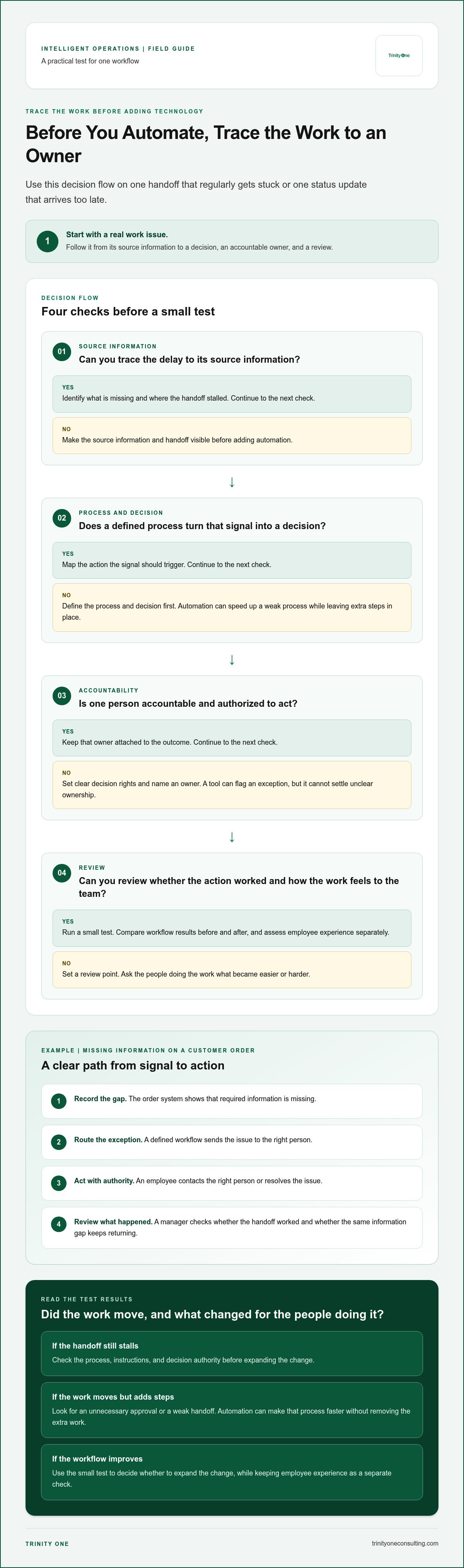
Start with one workflow where a handoff regularly gets stuck or status arrives too late. Set an owner, track whether the work moves, and ask the people doing it what has become easier or harder. That gives you a practical test before expanding the change.
Key Takeaways
- Intelligent business operations connect AI, processes, and people around clear decisions and accountable action.
- Trace one work issue from its source information to a decision, owner, and review to see where AI can support execution.
- Compare workflow results before and after a change, and assess employee experience separately.
- Begin with a defined operational problem and a small test, so you can catch unclear handoffs before expanding the work.
- Use intelligent business operations to align leadership cadence and visibility, including through Trinity Cadence’s execution and engagement visibility.
What do intelligent business operations connect?
Intelligent business operations connect processes, data, technology, and accountable people so information can guide a decision and move work forward. The operating model links what the business knows to who can act, what they’re responsible for, and when the result gets reviewed. A dashboard can show a delay. It can’t assign the next move.
Consider a customer order that’s waiting because required information is missing. The order system records the gap, a defined workflow routes the exception, and an employee with decision authority contacts the right person or resolves the issue. A manager then reviews whether the handoff worked and whether the same information gap keeps recurring. The aim is a clear path from signal to action.
What makes business operations intelligent?
Intelligence means useful information reaches someone who can make or guide a decision. That requires a workflow people understand, decision rights that aren’t left to assumption, and responsibilities that stay clear when work crosses teams.
For example, an AI tool might flag that an order is missing a required field. It can surface the issue or suggest a next step, but a named owner still needs authority to handle the exception. If sales and operations disagree about who owns the customer follow-up, new software won’t settle the dispute. It may only make the disagreement more visible.
That’s why I treat intelligent operations as a management discipline, not a software purchase. Leaders need to define which decisions data can support, who remains accountable, and how unresolved work returns to the team’s attention. Without those agreements, connected systems can still produce disconnected work.
How is this different from business process automation?
Business process automation handles defined tasks or steps, such as moving a submitted form into a queue or sending a notification when a field is incomplete. Intelligent Automation describes the use of AI with automation technologies. That capability can support a broader operating model, but it doesn’t decide who owns an outcome or how leaders should respond when a process breaks.
Intelligent operations connect a task to the information behind it, the decision it triggers, the person accountable for acting, and a review of what happened. That review matters. If the same exception keeps returning, the team can examine whether the process, instructions, or decision authority needs to change.
Automation has a real tradeoff: it can speed up a weak process without correcting it. If a team has an unnecessary approval step, automating it may get approvals through faster while preserving the extra work. Before automating, map the handoffs and ask what decision each one serves. Technology can carry out a defined process. People still have to decide whether that process makes sense.
How do AI, data, processes, and people work together?
In intelligent business operations, data gives AI something to analyze, a defined process turns useful analysis into a decision, and an accountable person decides what happens next. The work then returns to a regular review, where leaders can see whether the action addressed the issue or created another obstacle.
Take a recurring delay in preparing a customer proposal. Source data shows which required inputs are missing and when the handoff stalled. AI can group delays by cause and prepare a short view for the sales manager, but it can’t know every customer commitment or decide which exception deserves priority.
AI output needs a responsible human owner who can judge the context, approve the response, and answer for the result. The manager assigns someone to obtain the missing input, records the next action, and brings unresolved cases to the team’s scheduled review. That closes the loop from information to action instead of leaving an insight on a screen.
Where can AI support operational work?
AI is useful when its output serves a specific decision. It can surface a repeated cause of proposal delays, prepare relevant account details before a review, or help a manager structure a coaching conversation around a missed commitment. Each use needs a workflow with a clear next step.
IBM’s discussion of Agentic AI in Business Operations considers how AI agents may support operational work. The operating question for your team is practical: what decision can this output inform, and who has authority to act on it?
Human judgment matters because source information can be incomplete, priorities can conflict, and an exception may carry context that isn’t in the system. A manager can weigh those factors, explain a decision, and coach an employee through the next attempt. AI can support that work, but it shouldn’t become an unexamined substitute for accountability.
Why does operating cadence matter?
A regular huddle gives commitments a place to be checked while there’s still time to respond. The team reviews the priority, confirms who owns each action, identifies what has moved, and names the obstacle that needs a decision. Keep the conversation tied to the work, not a tour through every dashboard.
Real-time execution visibility can help an owner spot a stalled commitment before the next formal review. It won’t resolve the obstacle by itself. The owner still needs a clear way to raise the issue, get a decision, and update the people affected.
Review time has a cost. If a meeting repeats status people can already see and produces no decision, it consumes attention without changing the work. Set a purpose for each review, name the decisions it should produce, and change the rhythm when the team no longer needs that checkpoint.
How can you tell whether intelligent operations are working?
Compare the same measures before and after a change to one defined workflow, then review execution and employee experience separately. Faster completion matters only if the work reaches its intended outcome and the people doing it can carry out the process clearly.
Choose a narrow workflow, such as resolving a customer service ticket that needs input from another team. Record a baseline before changing the process. After the change, use the same definitions and scope. If you change what counts as “resolved” halfway through, the comparison won’t tell you much.
Which operational measures should leaders review?
Choose measures that show whether work is moving and whether the result holds up. Define how each measure is counted before implementation, including where the clock starts and stops. Keep the calculation consistent across both periods.
| Measure | What it tells you | Possible tradeoff |
|---|---|---|
| Time to resolution | How long the ticket takes to reach the agreed outcome. | A faster close can hide an incomplete or incorrect resolution. |
| Reopened tickets | Whether the initial response addressed the customer’s issue. | More detailed tracking takes staff time and needs consistent definitions. |
| Unresolved work at review | How much work is waiting for information or a decision. | A snapshot can miss tickets that were resolved and then reopened. |
These measures answer different questions. A shorter resolution time doesn’t prove that customers got a useful answer, and a smaller queue doesn’t tell you whether employees are spending more effort on each ticket. Read the measures together, but don’t collapse them into one score.
An efficiency gain matters only if the target outcome improves. If the goal is a correct resolution with fewer avoidable handoffs, a faster clock alone doesn’t meet the goal.
How should employee impact be assessed?
Ask the people handling tickets what changed in the actual work. Did the new process remove a repeated lookup, or add another screen and a second entry? Do employees know who owns an exception, and do they have enough information to act? Specific questions get better answers than “How’s the new system?”
Gather feedback in a focused check-in or a short written prompt, and leave time to discuss a confusing step. That time is a real operating cost. Keep the review tied to the workflow, record recurring friction, and avoid turning feedback into a general satisfaction exercise that produces no decision.
Be careful about claiming that AI caused a change. Demand, staffing, ticket mix, or a policy change may also affect results. Note what else changed during the comparison period, and treat the finding as evidence to investigate when you can’t separate those effects cleanly.
How can you introduce intelligent operations without disrupting work?
Start intelligent business operations with a recurring workflow problem, then test a small change against clear measures before expanding it. A contained pilot lets you see whether ownership, handoffs, and employee experience improve while the rest of the operation keeps moving.
Don’t begin with a software shortlist. Begin with the work that’s getting stuck, and keep the test small enough to see what changes.
What should a first operational pilot include?
Choose a process with a visible delay, repeated handoff, or missing information. Record how the work moves now, who handles each step, what outcome you want, and which measures you’ll use to judge it. Keep known constraints in view, such as customer deadlines or steps that can’t be paused.
Use this sequence:
- Name the problem. Describe where work stalls and how the delay affects the customer or the next team.
- Map the current process. Write down the handoffs, decision points, owners, and baseline measures before changing the workflow.
- Set a narrow test. Change one part of the process and agree on a review point to continue, revise, or stop.
- Review what happened. Compare results with the baseline, check for unintended effects, and decide whether to scale based on evidence.
A measured pilot result should determine whether you scale, revise, or stop the change. If ownership remains unclear or the outcome hasn’t improved, expanding the test will spread the problem rather than solve it.
The pilot has a cost. Staff need time to document the current process, learn the revised steps, and report what’s working. Managers also need time to review results and respond. Keep the test narrow enough that this extra work doesn’t become a second job for the people already carrying the workflow.
How do you keep people involved during the change?
Tell employees why the workflow is changing, which steps may change, and what will stay in their hands. People doing the work can spot a missing handoff or a real-world exception that a process map may miss. Ask for their input before the test begins, then make it easy to raise a concern during the pilot.
Name one leader to receive concerns, make or route decisions, and report back to the team. Silence after feedback erodes trust. Even when the answer is to keep the process as designed, explain why and note what would justify an adjustment later.
Protect time for focused feedback. A short conversation about a specific step is more useful than another general meeting with no decision attached. I’ve seen operational changes hold up better when employees understand the purpose and can see how their input affected the process.
How can a leadership team put intelligent business operations into practice?
Put intelligent business operations into practice by pairing a clear operating rhythm with useful execution visibility and named leadership ownership. Once you’ve defined what success looks like for a workflow, the team needs a reliable way to review commitments, see where work stands, and decide who will address an obstacle.
That’s the operating discipline behind Trinity One’s AI-native operating system and leadership services. The system supports execution, while leaders remain responsible for how work is assigned, reviewed, and improved. A tool can display a missed commitment. Someone still has to decide what happens next.
What does an integrated operating cadence provide?
Trinity Cadence brings together a unified operating cadence, AI coaching, and real-time visibility into execution and engagement. The cadence gives leaders a consistent structure for reviewing work. Execution visibility shows progress, while engagement visibility keeps attention on the people carrying out the plan.
That distinction matters. A team can hit a target while employees are dealing with confusing instructions or unnecessary strain. Engagement information gives leaders another signal to consider, but it doesn’t replace a direct conversation or prove that the workflow is healthy. I believe a company becomes its best version only as its people become better versions of themselves.
Use the cadence to connect measures you’ve already defined with decisions leaders can make. If commitments keep slipping, identify the owner and the next action. If employees report that a new step is unclear, address the process instead of treating the metric as the whole story. A regular review takes time, so each meeting needs a clear purpose and decisions worth that time.
When can a fractional COO or Integrator help?
A system can show where execution is off track. Operational leadership gives the organization ownership for deciding how to respond. A fractional COO or Integrator can help leaders clarify priorities, coordinate accountability, and keep execution connected to the operating plan. That’s ongoing leadership work, not simply access to software.
Fractional COO and Integrator support can help when responsibilities cross departments, commitments lack a clear owner, or leadership reviews identify the same unresolved issue week after week. The role is to bring structure to execution and help the leadership team act on what it sees. It doesn’t remove the need for employees and managers to make decisions in their own areas.
Choose operating support that matches the gap. If the workflow is defined but leaders lack a consistent review rhythm, establish the cadence. If ownership is unclear, assign it before adding technology. If the team needs both visibility and leadership follow-through, connect the system with operational ownership, then review execution and engagement together.
Put your next operating decision on the calendar
Intelligent business operations take shape through the choices leaders make after a problem becomes visible. Pick an issue your team can address without adding unnecessary work, then make space to decide what support and ownership it needs.
I’ve spent years leading teams as an operator and coach. I’ve learned that change holds more value when people understand its purpose and have a real voice in how the work develops.
Frequently Asked Questions
Is intelligent business operations the same as business process automation?
No. Automation carries out defined steps, while intelligent business operations also connect those steps to decisions, accountability, and ongoing review. For example, a tool might route a purchase request automatically, but leaders still need to set approval limits and decide how exceptions are handled. Automation can be one part of the operating model. It can’t determine whether the process serves the business purpose.
Can a company use intelligent business operations without replacing its existing software?
Yes. A company can begin by clarifying how current systems support a specific workflow, then identify where information gets lost or decisions stall. For example, teams might use their existing project records to assign an owner and review overdue commitments during a regular leadership meeting. New software may help later, but replacement brings migration and training demands that may not address unclear responsibilities.
Does a business need AI to make its operations more intelligent?
No. Teams can improve operations by clarifying decision rights, documenting handoffs, and reviewing commitments consistently, even without AI. A manager might find that a service request waits because nobody owns the final approval. Assigning that responsibility can address the delay directly. AI may help analyze larger sets of information or prepare coaching prompts, but it adds little value when the underlying work and ownership remain unclear.
How can a small business choose its first intelligent operations project?
Choose a recurring workflow with a visible cost in time, rework, or customer follow-up, where the people doing the work can describe the problem clearly. A small business might examine how invoices move from receipt to approval. Keep the test limited to that process, name one accountable lead, and avoid starting with a company-wide software rollout that could distract staff from serving customers.
What should leaders measure when introducing AI into business operations?
Measure whether the AI-supported task improves the intended outcome, and note what changes for employees. For invoice review, leaders could track how often staff need to correct extracted details and whether approvals meet the agreed schedule. Keep the measures and definitions stable during the test. Also record changes in staffing or workload, since those factors can affect results independently of AI.
How can leaders address employee concerns about AI and operational change?
Explain what the tool will do, which decisions remain with employees, and how the team can flag errors or added work. Then ask the people using it to identify a specific task that feels unclear or harder to complete. Close the loop by sharing what leaders decided and why. Clear communication takes time, but ignoring concerns can leave staff working around the new process.
How long does it take to implement intelligent business operations?
There isn’t one timeline that fits every company. A focused workflow test may take less coordination than a change involving several teams, new decision rules, or extensive staff training. Before setting dates, define the process, who owns each decision, what needs to change, and how results will be reviewed. Allow time for employees to learn the revised work and for leaders to respond to what they find.
If you want to discuss an operating challenge in your business, book a discovery call with me.