
The safest first AI project is usually a handoff, not a decision. Small business AI automation ideas work best when they remove repeated steps, such as sorting incoming inquiries or copying invoice details into a system. People still need to judge what a customer needs and what the business should promise.
If you’re losing time to repeated data entry, the appeal is obvious. But an AI tool can misread a message, move the wrong information, or expose sensitive details if the workflow isn’t designed carefully. Saving minutes on a task can cost more in rework when nobody owns the final check.
A practical starting point is to look for one routine task with a clear beginning, a clear result, and a person responsible for reviewing it. I’ll focus on useful opportunities in everyday business work, the tradeoffs and human checks they need, and how to choose a small workflow you can measure before expanding it. The goal is steady progress, with your team’s judgment and trust intact.
Key Takeaways
- Start with repeatable work that has consistent inputs and a result you can check. Keep decisions that require judgment in human hands.
- Evaluate small business AI automation ideas by the cost of an error, the sensitivity of the information, and how a person will review the output.
- For a sales or admin workflow, define what starts the automation and where an employee must check its work.
- Before a pilot, record how long the task takes, common errors, handoffs, and who owns the work. Use those details to judge whether the change helped.
- Assign each workflow an owner and a regular review for exceptions, so automation supports team accountability instead of obscuring it.
Which small business AI automation ideas should you consider first?
Start with a repeatable, rule-based task that has clear inputs and an output you can check. The strongest small business AI automation ideas remove a known point of friction, such as sorting a routine request, without handing important judgment to software.
AI automation uses artificial intelligence to interpret information or generate a suggestion, then may pass that result into a connected business tool. A draft response waiting for review is different from a workflow that sends the response or updates a customer record automatically. The second can save another step, but it can also carry an error farther before anyone sees it. Business process automation provides the broader context: software carries out defined steps in a business process, while AI can help interpret less structured inputs.
What makes a task a sensible first automation?
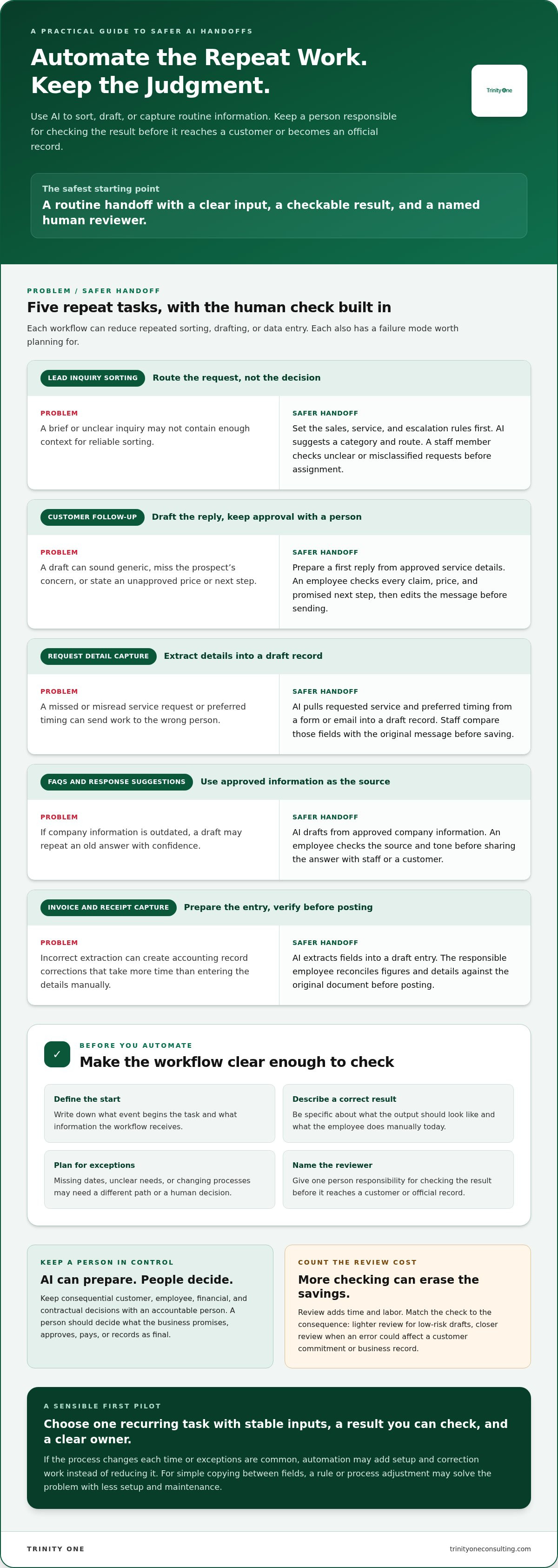
Choose a recurring task with a stable process and one identifiable person accountable for the result. Before selecting a tool, write down what starts the task, what information it receives, what a correct result looks like, and what the employee does manually today.
Include the exceptions. A request with a missing date or unclear customer need may need a different path from a complete, routine submission. If exceptions are common or the process changes each time, automation may add setup and correction work instead of reducing it.
Some repeated tasks don’t need AI. If staff copy the same approved information between two fields, a simpler rule or an adjustment to the process may solve the problem with less setup and maintenance. AI earns its place when interpreting the input or preparing a useful draft is part of the work.
Which tasks should remain under human control?
Keep consequential customer, employee, financial, and contractual decisions with an accountable person. AI can organize facts or prepare a recommendation, but the person responsible should decide what the business promises, approves, pays, or records as a final decision.
Give the reviewer a practical way to check the output before it reaches a customer or becomes part of an official record. That can mean comparing extracted details with the original request, checking that a draft doesn’t promise an unapproved discount, or routing uncertain cases to an employee rather than letting the workflow proceed.
Review has a cost. It adds time and labor, and it can erase the savings if every routine output requires a full manual recheck. The answer is to match the check to the consequence: lighter review for low-risk drafts, closer review when a mistake could affect a customer commitment or a business record. I’d rather see one well-owned task working reliably than a long list of automations nobody maintains.
Where can AI automation reduce repetitive sales and admin work?
Small business AI automation ideas are most useful when they remove repeated sorting, drafting, or data entry without taking the final call away from an employee. The SBA guide to AI for small business offers broader context for applying AI at work. Start with the handoffs your team repeats each week, then make the review point clear.
How could AI help with sales and customer requests?
Set the routing rules before adding AI. For example, define which inquiries go to sales, which need service support, and which must be escalated because they don’t fit a standard category.
- Lead inquiry sorting: When a new inquiry arrives, AI can classify it by your defined criteria and suggest a route. A staff member checks unclear or misclassified requests before assignment. The downside is that brief messages may not include enough context to sort reliably.
- Follow-up drafts: After a lead requests information, AI can prepare a first reply using approved service details. An employee checks every claim, price, and promised next step before sending. Drafts can sound generic or miss a prospect’s specific concern, so they still need editing.
- Request detail extraction: When a customer sends a form or email, AI can pull details such as the requested service and preferred timing into a draft record. Staff compare those fields with the original message before saving them. A missed or misread detail can send the request to the wrong person.
Which admin tasks can AI prepare without owning the decision?
Admin work often looks simple until a small mistake travels into a customer record or financial system. Use AI to prepare a draft, not to silently establish a fact.
- Internal FAQs and response suggestions: When staff ask a recurring question, AI can draft an answer from approved company information, or suggest a response to a routine customer message. An employee checks the source and tone before sharing it. If the approved information is outdated, the draft can repeat an old answer with confidence.
- Invoice and receipt capture: When an invoice or receipt arrives, AI can extract fields into a draft entry for review. The responsible employee reconciles the figures and details against the source document before posting them. Incorrect extraction can create corrections in accounting records later, which may cost more time than the original entry.
Routine reminders can follow the same pattern: AI prepares a prompt when a defined event occurs, then a staff member approves it before it goes out. That checkpoint adds labor, but it helps protect customer trust and keeps the person responsible in control of what the business communicates.
Which operations and leadership workflows can AI automate safely?
AI can prepare operational drafts, sort routine intake, and flag missing updates when the source information is reliable and a person owns the next step. These small business AI automation ideas become risky when the process changes often, the data is sensitive, or an error carries serious consequences.
What leadership and reporting work could AI prepare?
After a team meeting, AI can turn an approved transcript or notes into a draft record of decisions and action items. An attendee checks names, commitments, and deadlines before the notes are shared. AI can suggest an owner based on the discussion, but a manager should confirm the assignment rather than letting a guess become someone’s responsibility.
A weekly status summary can gather updates from approved project sources and flag a task with no recent update. It can report that information is missing. It can’t reliably determine why work is late, whether a priority changed, or what support an employee needs. Those require a conversation. For teams building a reporting rhythm, a guide to automating leadership reports can help shape the process, but the data still needs a clear owner and review point.
How do you separate low-risk tasks from decisions that need judgment?
Compare each workflow across four checks: how repeatable the task is, what an error could affect, how sensitive its data is, and how much review it needs. A repeatable task can still be a poor automation candidate if a mistake affects a customer commitment or exposes private information.
- Draft-only assistance: AI searches internal procedures or prepares a meeting-note draft from approved material. A named employee checks accuracy before anyone relies on it. This is a poor fit when the source documents are outdated or conflicting.
- Human-approved actions: AI routes service-delivery intake to a suggested team or prepares an action list from meeting notes. The assigned reviewer confirms the route or owner, and sends exceptions back to a person for correction. Approval takes time, but it catches misrouting before work stalls.
- Higher-risk decisions: Keep decisions affecting employees, finances, customer commitments, or contracts under accountable human control. AI may organize relevant information, but it shouldn’t make the final call. The added review effort is the cost of keeping judgment with the person responsible.
Every automated handoff needs a named reviewer and a correction path. If a procedure search returns the wrong instruction, staff need a way to flag the source and find the right answer. If your process or source data is unreliable, automation can increase rework by repeating the same bad information faster. Fix the operating process first, then automate the parts that stay consistent. Business owners seeking help to evaluate and refine their operational systems can turn to SA Business Coaching for hands-on guidance.
How do you choose and launch your first AI automation?
Choose one repeatable task, record how it works today, and run a limited pilot with a named owner and a human review point. Small business AI automation ideas only earn a place in your operation when the time saved exceeds setup, checking, and correction work.
How should a small business set a useful baseline?
Before changing the process, record how often the task occurs and how long each run takes. Note the common error types, where work waits between people, and which employee is responsible for the result.
Track corrections and delays too. There’s no useful savings benchmark to borrow from another business when your task volume, process, and review needs are different. These baseline notes give you a fair comparison later, including the inputs for measuring actual AI implementation ROI.
What should a small-business AI pilot include?
Keep the pilot to one workflow, one accountable owner, and a defined review period. Write down what an acceptable result looks like, which cases must go to a person, and who can change the process if the automation creates errors.
- Select the task: Pick a recurring workflow with clear inputs and a result you can verify.
- Map the current work: Record time, errors, handoffs, task frequency, and the responsible employee before making changes.
- Set access and rules: Limit the workflow to approved data sources. Define what it can prepare or do, what needs approval, and which exceptions stop the process.
- Build a correction path: Name the reviewer and decide how they can pause the automation, correct an output, or flag a recurring problem.
- Run and review the pilot: Compare the new process with your baseline. Count setup, review, and correction time along with any time removed from the task.
- Keep, adjust, or stop: Continue only if the workflow produces a useful net result and the owner can maintain the review process.
A faster automated step can still leave the full task slower. If someone spends more time checking a draft than they spent writing it, or has to repair records after a bad handoff, the apparent time saving isn’t a real gain. That’s why the review should include the whole workflow, not just the seconds the tool takes to generate an output.
Setup and review may outweigh the value of a low-volume task. Don’t automate it just because the tool can. If the pilot adds work without improving the result, pause it and revisit the process before expanding the automation.
How can AI automation fit the way your team runs the business?
Small business AI automation ideas work best when they fit the way people already hand work off, make decisions, and report progress. A tool without an owner or a regular review can create another queue for employees to manage.
Who owns an automated workflow after launch?
Give one person responsibility for the workflow after launch. That owner monitors whether it follows the process, checks output quality, handles exceptions, and reviews whether the workflow still makes sense as the business changes.
Ownership doesn’t mean one employee must do every step. It means someone knows who corrects a bad result and how that correction reaches the process owner. Staff feedback matters here. An employee who has to re-enter information or explain an unclear handoff can show you where the automation is adding work rather than removing it.
If workflows cross departments and no one has clear operating authority, a Fractional COO or Integrator can help establish ownership and accountability. That work takes time from leaders and staff, who need to agree on responsibilities and keep them current.
How can leaders keep people and execution connected?
Put exceptions into the operating cadence your team already uses. In a regular huddle, the owner can report which automated handoffs worked, which needed correction, and whether any blocked work needs a decision. The team can address a missed handoff before it becomes another delay for a customer or coworker.
Track the result that matters to the business, not merely whether a tool was switched on. If an AI-assisted intake process was meant to reduce delays in assigning work, review assignment delays and unresolved exceptions. Tool activity alone doesn’t show whether responsibilities are clearer or employees have fewer steps to complete.
Trinity Cadence combines an AI-native operating system with AI coaching, strategy tracking, meeting huddles, and visibility into execution and engagement. It can connect workflow activity to team accountability, while leaders and employees remain involved in decisions and follow-through. That regular review takes time, but without it, exceptions can sit unnoticed and staff may lose trust in a process they don’t understand.
Make room for employees to say when a new workflow creates confusion or shifts work onto someone else. Their feedback helps you correct the process and build a system that supports both execution and the people responsible for it.
Choose one workflow and keep the people in the loop
The strongest small business AI automation ideas start with a task you can describe, measure, and assign to an owner. Automate repeatable preparation or handoffs, then keep a person accountable for judgment, exceptions, and the final result.
Measure the full workflow, not only the minutes an AI tool removes. Setup, review, and corrections count too. If the process leaves employees with less rework and clearer responsibilities, you’ve got a useful signal to keep learning from.
Trinity One’s founders bring over 30 years of operational experience. Trinity Cadence combines operating cadence, AI coaching, and execution visibility, helping leaders connect workflow changes with team responsibilities and follow-through.
Start with one practical change. Give your people the support and clarity to make it work.
Frequently Asked Questions
What are the best AI automation ideas for a small business?
The best small business AI automation ideas handle recurring tasks with clear inputs, stable steps, and outputs someone can verify. AI might categorize incoming customer inquiries or prepare a weekly status report from approved updates. Choose based on how often the task occurs, the cost of an error, and the time needed to review results. Keep a person accountable for exceptions and consequential decisions.
Can AI automate customer service for a small business?
AI can help categorize customer requests, find approved information, and prepare reply drafts. A staff member should review messages involving unusual circumstances, commitments, sensitive information, or unclear intent. Review takes time, but unsupervised replies can create corrections or customer friction. Start with a narrow group of routine requests, such as questions answered by an approved FAQ, then track errors before expanding the workflow.
How do I know which business task to automate first?
Compare how often the task occurs, how much time it takes, how consistently staff follow the process, and what an error could affect. Include setup and review effort in that comparison. Record the current process before testing, including task time, delays, corrections, and handoffs. A frequent task with stable inputs may make a better pilot than an occasional task requiring judgment. Measure net time saved, not automated steps.
Is AI automation safe for small-business data?
Safety depends on what information enters the tool, its settings and access permissions, and the workflow’s review controls. Decide which data is approved for use and limit access to people who need it for their work. Don’t treat these steps as a guarantee. Have a person review outputs involving confidential records, financial decisions, or customer commitments before the information is used or shared.
What happens if an AI automation makes a mistake?
Pause the affected workflow, correct the output, and identify where the error began. Then check whether it affected other records or handoffs. Each pilot needs a named owner and a clear route for exceptions to reach a person. If errors keep happening, review the source data and instructions. The task may need a clearer process, or it may be a poor fit for automation.
How can a small business measure whether AI automation is worth keeping?
Compare the pilot with the original process using task time, delays, corrections, and employee review effort. Include setup and ongoing maintenance, then judge whether the workflow improved the actual operating result, not only how quickly one step ran. A guide to measuring actual AI implementation ROI can help you structure that review. Keep the automation only if the measured result justifies its full workload.