
Moving from spreadsheets to an operating system starts with the way your team runs recurring work, not with a software purchase.
The safest way to move from spreadsheets to an operating system is to set the operating discipline first, then move the information. The change works when each process has a clear owner and the team agrees where the current information lives.
If two people are working from different versions of the same file, adding software can make the confusion harder to see, not easier to fix. The same is true of a task with no clear owner or a decision that keeps getting deferred. The work still needs to get done, and maintaining a second process on top of it costs time.
Software can support good execution, but it can’t decide who owns a handoff or what the team needs to resolve in its regular meetings. Those practices need to be defined by the people doing the work. Trinity One’s operational work is grounded in more than 30 years of experience.
Start by identifying which spreadsheet process causes repeated confusion and what the team needs to see to act on it. From there, establish a working cadence, clarify ownership, and move shared information without asking employees to maintain two versions of the job. The goal is a transition that fits the work people actually do.
Key Takeaways
- Consider moving from spreadsheets to an operating system when recurring work suffers from duplicate files, unclear ownership, or status updates that depend on manual chasing.
- Define the routines, responsibilities, shared information, and review practices your team needs before choosing software to support them.
- Keep spreadsheets used for analysis separate from files used to coordinate recurring commitments across teams.
- Before moving a process, document what its spreadsheet tracks and which decisions rely on that information.
- Pilot one process first, and plan for training time, employee questions, and temporary parallel work during the change.
When does moving from spreadsheets to an operating system make sense?
Moving from spreadsheets to an operating system means changing how work is owned and reviewed, then choosing software that supports those routines. The signal to act is not that your team uses spreadsheets. It’s that important recurring work depends on files with no reliable owner or review process.
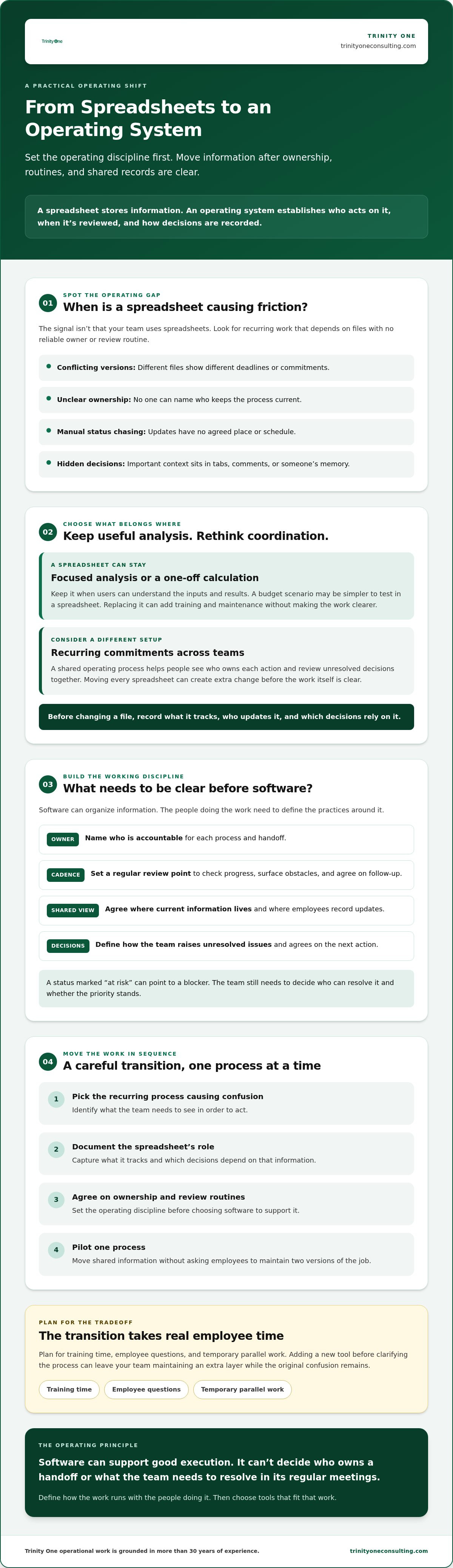
A spreadsheet stores information. An operating system establishes who acts on it, when they review it, and how they record the decision.
Business software can help manage company work, but software alone can’t set priorities or assign accountability. If a weekly commitment lives in a spreadsheet, the team still needs an agreed owner and a regular time to check progress.
Which spreadsheet problems signal an operating gap?
Look for repeated friction in recurring work. Different file versions can show different deadlines or commitments, leaving the team unsure which information is current. If only one person knows what a tab or formula means, that person’s absence can stall the work. Repeated requests for updates often point to a missing owner or review routine, not a lack of effort from employees.
- Several files carry different versions of the same plan.
- No one can name the person accountable for keeping a process current.
- Managers chase status because updates have no agreed place or schedule.
- Key decisions are buried in tabs, comments, or someone’s memory.
Those are signs to examine the operating process, not instructions to delete every workbook. A spreadsheet used to compare costs for a one-time decision is different from the only record of who’s doing what across teams.
When should a spreadsheet stay in place?
Keep a spreadsheet when it serves focused analysis or a one-off calculation and the people using it can understand the inputs and results. It may be the simplest tool for testing a budget scenario. Replacing it can add training and maintenance without making the work clearer.
Consider a different setup when people need to coordinate recurring commitments, see who owns each action, and review unresolved decisions together. Moving every spreadsheet creates unnecessary change. It can also burden employees with maintaining a new tool when the underlying process hasn’t been clarified.
Before changing a file, write down what it tracks, who updates it, and which decisions rely on the information. That brief inventory helps you distinguish useful analysis from an operating record your team can no longer manage reliably.
What does moving from spreadsheets to an operating system actually mean?
Moving from spreadsheets to an operating system means agreeing how work is prioritized, owned, shared, and reviewed, then using software to support that agreement. The operating system is the working discipline around the information. It gives people a clear way to move commitments forward and raise decisions that need attention.
Software holds and presents the information. Operating discipline determines who acts on it and what happens next.
What belongs in the operating system beyond the software?
Start with priorities. People need to know which commitments matter now and who owns each one. Meeting huddles create a regular point to review progress, surface obstacles, and agree on follow-up. Without those habits, a dashboard can display late work without prompting anyone to address it.
Shared information gives leaders a common view of execution. It doesn’t make decisions for them. A status marked “at risk,” for example, is a reason to ask what’s blocking the work, who can resolve it, and whether the priority still stands. The team still needs judgment and a clear next action. To see how enterprise knowledge graphs unify complex organizational data into an actionable format, learn more about Syntes AI.
Employees also need to understand how their work enters the system and where an update goes. If someone completes a task but doesn’t know where to record it, the information becomes stale and leaders lose confidence in the record. Clear steps reduce guesswork and make it easier for people to contribute without relying on one colleague to interpret the process.
How do software and operating cadence work together?
A platform can organize strategy tracking and meeting information so people can review commitments in a shared place. Trinity Cadence is one example. It combines operating cadence, meeting huddles, strategy tracking, AI coaching, and visibility into execution and engagement. That’s software supporting defined routines, not a requirement for every company or a substitute for leadership.
AI coaching can support operations, but it can’t take responsibility for setting priorities or deciding how to respond when a commitment slips. Leaders still have to ask the follow-up question and make the call. The tool can inform that judgment, but it can’t own it.
A new platform also needs upkeep. Someone must maintain its information and help the team use it consistently. If no one owns that work, employees may end up updating both the platform and the old spreadsheet, adding effort without improving visibility. Define the cadence and the owner first. Then decide which software actually supports the work.
How should you compare spreadsheets with an operating system?
Moving from spreadsheets to an operating system makes sense when recurring work needs shared ownership and review, not simply because a spreadsheet looks dated. A workbook used to analyze a one-time purchase can remain useful. A file coordinating commitments across teams needs clearer rules for updates, decisions, and follow-up.
What does each approach make easier or harder?
Spreadsheets are familiar and flexible. A person can change a calculation or add a field without waiting for a system change. But when several people update the same record, someone must maintain the shared version and resolve conflicting edits. An operating cadence can make ownership and review more consistent, though setting it up takes time and asks employees to learn new habits.
| Area | Spreadsheet-led work | Operating cadence with software |
|---|---|---|
| Ownership | May depend on whoever knows the file or remembers to update it. | Can make a named owner and follow-up routine visible. |
| Visibility | People may need to open tabs or ask for status to see progress. | Shared information can support regular review across a team. |
| Update effort | Flexible edits are easy, but multiple contributors can create version work. | Updates follow a defined process, which takes training and upkeep. |
| Decision history | Decisions may be scattered across cells, comments, and separate copies. | A shared review practice can make decisions and follow-up easier to find. |
| Change burden | Familiar to current users, but difficult to coordinate as work expands. | Creates new learning and configuration work before it becomes routine. |
The right choice depends on the work, the people doing it, and the responsibilities already in place. A spreadsheet may be right for analysis. It’s a weaker fit as the only record of recurring cross-team commitments when people need a dependable way to see ownership and review progress.
What should leaders assess before choosing a platform?
Test the platform against the meetings and review routines your team actually uses. Can people find the information they need before a huddle? Can they record an update without keeping a second, unofficial tracker? A dashboard can show status, but it can’t decide which commitment should take priority.
Name the person responsible for data quality, access, and process changes before rollout. Then assess AI features against the work they are meant to support. Be specific about the task, the expected change to the workflow, and how the team will review whether the feature is useful. A feature that adds steps without improving the process may not be worth adopting.
How can you move from spreadsheets to an operating system without disrupting work?
Moving from spreadsheets to an operating system works best as a phased transition: map recurring work, choose one process, assign ownership, pilot the new routine, then review and adjust. Keep the current work moving while you test the change. Expect some temporary double entry before the team can retire its old tracker.
Migration should preserve useful decisions, not every old column. Before moving information, record what each spreadsheet tracks and which decisions depend on it. Some fields may support a real decision. Others may be leftovers no one uses.
How do you choose the first process to move?
Pick recurring work with visible handoffs and a business owner who can make decisions about the process. Avoid starting with the most sensitive workflow or one that no one fully understands. A first pilot should teach the team how the new routine works, not force employees to resolve unclear responsibilities while learning unfamiliar software.
Write down the process inputs, decision points, accountable owners, and current review rhythm. For example, if a team tracks recurring cross-functional commitments in a spreadsheet, note what information people need before they can accept or complete each handoff. Keep the record practical. The goal is to see how work moves today, including exceptions people handle from memory.
How do you pilot the change and learn from it?
Choose a review point before the pilot begins. At that meeting, check whether the team can find the information it needs, whether each commitment has an owner, and where decisions still get stuck. Then ask employees directly: “Where did this routine create extra work or leave you unsure what to do?” Their answers can expose a process flaw that a dashboard won’t show.
Change the routine before expanding it. If employees have to update the new system and the spreadsheet for the same purpose, identify which record remains authoritative and when the duplicate update can stop. Keep necessary source records available during the transition. Removing the old file too early can cut off information people still need to explain prior decisions.
A phased move takes attention upfront. Leaders must make time for questions, review the pilot, and resolve ownership gaps while the existing process continues. That temporary overlap is a real tradeoff, but skipping the pilot can spread a confusing process across more of the business.
Use the pilot review to decide what to change before moving to the next process. This gives employees a chance to shape a routine they’ll be expected to use.
How do you make the new operating system work for people?
People judge a new operating system by what leaders do with it. If you expect employees to bring commitments to a huddle, bring your own commitments and follow through on them. A manager who asks for accountability but ignores agreed review practices teaches the team that the process is optional.
Build adoption around the work employees are responsible for. Explain how their updates inform decisions, and make clear who can change a priority or resolve a stalled handoff. People need to see that the system helps them act, not simply gives leaders another way to monitor activity.
What should leaders do when employees resist the change?
Ask what the change feels like from the employee’s perspective. Which current task does it replace? What new work does it add? Listen for concrete friction, such as entering the same update in two places or waiting for approval from someone whose role is unclear.
Then respond to the cause. If decision rights are vague, clarify who can approve a change and when an issue should be raised. If the routine creates extra steps, adjust it. A recurring workaround may show that the process doesn’t match how the work gets done.
When can an operator help the transition hold?
A Fractional COO or Integrator can help leaders make operational ownership and review expectations explicit, especially when responsibilities cross teams. That person can also help keep agreed routines in view as leaders and employees adjust to new expectations. Learn more about Fractional COO support.
Trinity Cadence is one example of software supporting operating cadence through strategy tracking, meeting huddles, AI coaching, and visibility into execution and engagement. These tools can help people work from shared information. Leaders remain responsible for the quality of their decisions and the way they treat the people carrying them out.
Set the operating rhythm before changing the tool
Moving from spreadsheets to an operating system starts with a practical choice: keep spreadsheets that serve analysis, and change recurring work that lacks clear ownership or review. Map what the team actually does, then pilot one process before moving others. Expect some temporary duplicate updates while employees learn the new routine.
The tool matters, but the habits around it matter more. Leaders need to review commitments where the team can see them, clarify who owns follow-up, and respond when work gets stuck. That gives employees a clear reason to keep shared information current.
Trinity Cadence supports operating cadence, strategy tracking, meeting huddles, AI coaching, and visibility into execution and engagement. It’s one example of software supporting defined practices. Trinity One was founded by practitioners with more than 30 years of operational experience.
Your team can make this change one workable process at a time. Keep the people doing the work involved in shaping it.
Book a discovery call with Kevin
Frequently Asked Questions
When should a business stop using spreadsheets to manage operations?
Stop relying on spreadsheets as the sole record for recurring operations when people work from conflicting versions, can’t identify an owner, or must chase updates to see whether commitments are on track. Moving from spreadsheets to an operating system makes sense when shared execution needs consistent ownership and review. Keep spreadsheets that support analysis. Change the process that leaves people unsure which commitment or decision is current.
What is the difference between a spreadsheet and a business operating system?
A spreadsheet is a tool for storing, calculating, and organizing information. A business operating system includes the routines and responsibilities that guide how people act on that information. It sets expectations for ownership, review, and follow-up. Software can make shared information easier to access, but it can’t decide priorities or hold a person accountable. Leaders and employees create those operating practices through the way they work.
How do I move from spreadsheets to a management system?
Start by documenting what a spreadsheet tracks and which decisions depend on it. Choose one recurring process with a clear business owner, then agree who updates the information and how the team reviews progress. Pilot the new routine while keeping necessary source records available. Ask employees where the steps are unclear or create extra work. Adjust the process before expanding it to other teams or commitments.
Can a business operating system still use spreadsheets?
Yes. An operating system can include spreadsheets when they suit the work. A workbook may remain a practical place to test a calculation or compare inputs for a specific analysis. The distinction is whether a spreadsheet supports the work or serves as the only record of recurring commitments. If several people depend on it to coordinate handoffs, ownership and review practices need to be clear.
What should I move out of spreadsheets first?
Start with recurring work that crosses roles and has visible handoffs, especially when managers repeatedly ask for status or employees aren’t sure who owns the next step. Choose a process with a business owner who can make decisions about how it should run. Avoid beginning with work that’s poorly understood or especially sensitive. Map its inputs and decision points before transferring information into another tool.
Why do employees resist a new operating system?
Employees may resist because the new routine adds steps without removing any current work. Ask what task the change replaces and what work it adds. They may also be unsure who can approve a change, resolve a delay, or decide which information is current. Clarify those responsibilities before expecting consistent updates. If people keep using workarounds, treat that as evidence the process may need adjustment.
Does buying business software create an operating system?
No. Software can organize shared information and support regular reviews, but it doesn’t set priorities or establish accountability by itself. Trinity Cadence supports operating cadence, strategy tracking, meeting huddles, AI coaching, and visibility into execution and engagement. Leaders still need to define how the team will use those functions and who owns the routine. Without that work, a new tool can add upkeep without changing how decisions get made.