
Automation should move routine work forward, but it shouldn’t make a consequential call without a clear owner. Human-in-the-loop automation explained simply: software handles repeatable steps, while a person reviews, approves, corrects, or escalates work at defined points.
If you’re unsure which tasks need review, or who’s accountable when an automated decision causes a problem, clarify the workflow before expanding it. AI can reduce repetitive work, but it can also miss context that a person responsible for the outcome would recognize.
In my 30 years of operational work, I’ve seen that a review step only works when someone owns it and knows what to do next. Routine, low-impact tasks may need limited oversight. Decisions with meaningful consequences need a named reviewer, a clear escalation path, and authority to stop or correct the process.
That control has a cost. Review takes time, can delay work, and loses value when people repeatedly check outputs without fixing the underlying process. Put human judgment where it matters, then use what reviewers learn to improve the system and the work around it.
Key Takeaways
- Human-in-the-loop automation explained in plain terms: automation handles repeatable steps, while people review decisions that need judgment or accountability.
- Map each workflow from intake to recorded outcome. Configure available confidence thresholds or exception rules to send uncertain cases for review.
- Start with one recurring process. Name the owner, the person who reviews exceptions, and the person who makes the final decision.
- Human review can reduce repetitive work, but it takes time and can’t repair unclear rules or a poorly designed process.
- Review exceptions and employee experience regularly. Trinity Cadence connects operating cadence with AI coaching and visibility into execution and engagement.
What is human-in-the-loop automation? Human-in-the-loop automation explained
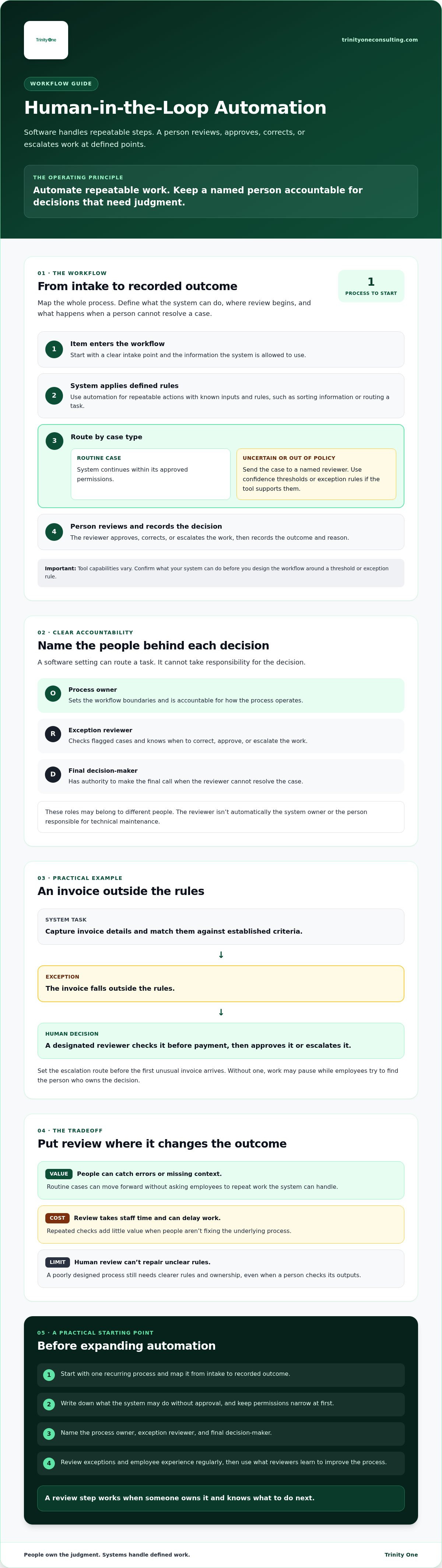
Human-in-the-loop automation explained in plain language is a process where software performs defined tasks and a person reviews or decides what happens when judgment is needed. The system moves routine work forward, while a named person remains responsible for the decisions the process sends their way.
That distinction helps you decide what to automate. Assigning human review to the right steps means employees don’t have to repeat work the system can handle, and they aren’t left guessing who owns a mistake.
How is human-in-the-loop automation different from full automation?
Full automation runs without routine human intervention once the process is set up. Human-in-the-loop automation adds a person at a defined point, before an action, while it’s being processed, or afterward. The Human-in-the-loop concept also appears in machine learning and other fields. For a business workflow, the practical question is: which decisions need a person’s attention?
That doesn’t mean someone must check every automated step. You can let the system handle routine cases and route exceptions for review, if the workflow is configured to identify them. Review can catch errors or missing context, but it takes staff time and may slow work while it waits for approval.
What does the human role actually include?
People may set the rules for what the system can do, review cases the process flags, or make decisions when an outcome carries consequences. Assign these responsibilities clearly. The person reviewing an exception isn’t automatically the system owner or the person responsible for technical maintenance.
Consider an invoice process. Software can capture invoice details and match them against established criteria. If an invoice falls outside those rules, a designated reviewer checks it before payment and decides whether to approve it or escalate it.
Document who reviews the exception and who has final decision authority. If the reviewer can’t resolve it, the escalation route should be clear before the first unusual invoice arrives. Otherwise, work may pause while employees try to determine who owns the decision.
In my 30 years of operational work, I’ve learned that a software setting can route a task, but it can’t take responsibility for the decision. People need to understand the rules and have authority to act within them. That clarity protects judgment and gives the system a defined job.
How does human-in-the-loop automation work from input to outcome?
Human-in-the-loop automation explained as a working process starts when an item enters a system and ends with a recorded outcome. The system processes the information under rules your business has set. If the item falls outside those rules, it goes to a person with authority to review it.
Take a purchase request. A system might sort requests using details such as the department or requested item, then route a request that doesn’t match established criteria to a reviewer. These are illustrative actions, not features you should assume every tool supports. Confirm what your system can do before designing around it.
Which steps should automation handle?
Start with repeatable actions that have defined inputs and rules. Depending on your tools, those actions might include sorting information, drafting a response, or executing repetitive fabrication tasks where operators oversee the process. For example, to see how collaborative robotics applies human-led automation in manufacturing, learn more about TME Systems Pty Ltd. Before automating a step, identify the process owner and write down exactly what the system may do without approval.
Keep permissions narrow at first. If the system can route a request but not approve it, make that boundary explicit in the workflow. Broader permissions may reduce manual handling, but they also increase the impact of unclear rules or incorrect information.
Route ambiguous, incomplete, or out-of-policy cases to a named reviewer. Some tools can use configured confidence thresholds or exception rules to flag work, but those settings vary. A threshold only helps if your team has agreed what should happen when a case crosses it.
The reviewer should record the decision and its reason in the process record, then follow a defined escalation route if the case can’t be resolved. That record gives the process owner something concrete to examine later. It doesn’t mean the system will learn from the decision automatically.
Review decisions can still inform deliberate process changes. If the same type of request keeps reaching a reviewer, the owner can check whether a rule is missing, intake information is incomplete, or permitted actions need adjustment. Changes to a model or its behavior depend on the tools and on the work your team does to update them.
Good interaction design matters because people need to understand what the system did and which decision is theirs. Stanford’s Human-Centered AI Institute discusses designing interactive AI systems as a human-computer interaction challenge. Apply that principle by making review instructions, decision options, and escalation steps clear to the employee doing the work.
Before expanding the workflow, have the process owner and reviewers check a sample of completed cases. Confirm that recorded decisions match the rules and that exceptions reached the right person. This review takes staff time, but it can expose unclear instructions before the process handles more work.
What are the benefits and tradeoffs of human review?
Human review can catch an exception before it moves to the next step. It can also support consistency when reviewers use the same clear criteria. But a person’s approval doesn’t make every automated decision safe. Human-in-the-loop automation explained plainly means setting up review to manage specific risks, not treating a reviewer as a guarantee.
What can human review improve, and what can it not guarantee?
A reviewer can spot details that don’t fit the written rules, such as a customer refund request with conflicting information. Catching the mismatch before a payment or response goes out gives the team a chance to pause and check the facts. IBM’s overview of Human-in-the-Loop (HITL) describes human input as part of an AI process. Its value depends on how your organization assigns and supports that work.
Review can still fail. If criteria are vague, the reviewer is rushed, or the work queue is too large, important details may be missed. Adding a sign-off step doesn’t correct a confusing policy or a broken handoff. Fix the underlying process, or review may add delay without making the outcome more dependable.
Accountability remains with the people and leaders assigned to own the process and its decisions. Software can produce an output and a reviewer can assess it, but your organization still needs to define who has authority to approve, correct, or escalate the result.
What does human oversight cost an organization?
The cost includes more than time spent checking an item. Reviewers need training on the criteria, a clear escalation owner, and time to document decisions. Someone also has to maintain the process as rules, inputs, or business needs change.
There’s a tradeoff between speed and depth. A quick check may keep routine work moving, but an unusual or consequential case can require more context and a slower decision. Match the review effort to the potential impact instead of asking every reviewer to apply the same level of scrutiny.
Some tasks are poor candidates for human review if every automated action still requires someone to repeat the same check. Reviewing each routine status update, for example, may consume the time automation was meant to free. Compare review and follow-up time with the effort the process actually removes. If review absorbs that time, revisit the rules, task choice, or workflow.
How do you design a human-in-the-loop workflow?
Human-in-the-loop automation explained as an operating design starts with one recurring process, not a company-wide rollout. Map each handoff from the moment work arrives to the final outcome. Mark where information goes missing, decisions stall, or employees have to redo work.
Choose a process with repeatable steps and outcomes you can observe. Before changing it, record how long the work takes, where rework occurs, which cases become exceptions, and how employees experience the current process. If ownership is unclear today, fix that first. Automation won’t decide who should make a call your team hasn’t assigned.
How should you choose a process for a pilot?
Start with a defined slice of work, such as routing a particular type of request. Document current handoffs and failure points, then agree on what a good outcome looks like. Your baseline gives you a fair comparison later. Without it, the team may mistake a new tool’s activity for an actual improvement.
Write down four responsibilities before configuring the system: who owns the process, who reviews flagged work, where unresolved cases go, and who has final decision authority. Then define the review triggers, expected response time, and information the reviewer must record. For teams deploying tailored solutions, specialists like Engineer Up develop custom AI agents and applications that embed these human-in-the-loop checkpoints directly into operational workflows. Specific assignments prevent exceptions from sitting in an inbox while everyone assumes someone else will handle them.
How do you prepare employees for the workflow?
Tell employees which tasks the system will handle and which decisions remain theirs. Give reviewers practice with unusual cases, including examples that fall between clear approval and clear rejection. They also need a named escalation contact and permission to pause work when a case exceeds the written rules.
Training takes time away from other work, and early reviews may feel slower as people learn the process. That cost is part of the pilot. Ask reviewers where instructions are unclear, then update the workflow rather than expecting employees to compensate for missing rules through guesswork.
Keep a written record of each exception, the reviewer’s decision, and any follow-up needed. Review that record with the process owner regularly. It gives the team evidence to adjust rules and handoffs while keeping responsibility with the people doing the work.
If you want to discuss how to assign owners and review points in your operation, details are available through a discovery call with me.
How can leaders keep human oversight connected to execution?
Human-in-the-loop automation explained in operating terms means someone remains responsible for checking whether the workflow is doing the job the business needs. A process can be configured correctly and still create friction for employees or send too many routine cases to review. Leaders need to monitor both the results and the experience of the people carrying out the work.
What should leaders monitor after a workflow goes live?
Assign a named owner and set a review schedule that fits the process’s volume and potential impact. Track process-specific measures such as completion time, exceptions, rework, and time spent reviewing. Compare them with the baseline recorded before the change. Don’t assume a higher automation rate means the workflow is working well.
Ask employees for specific examples. Does the system send straightforward work for review? Are people spending time correcting the same kind of output? Those details can point to unclear instructions, a misplaced review trigger, or a handoff that no longer fits the work.
Use review meetings to decide who will address each issue and by when. If exceptions rise, the owner should investigate the pattern rather than asking reviewers to absorb more cases. Include review and follow-up effort when assessing the workflow, since that time comes from other responsibilities.
How can software support leadership without replacing it?
Software can make work and exceptions more visible. It can’t set priorities for your team or take responsibility for decisions. Trinity Cadence provides a unified operating cadence, AI coaching, and real-time visibility into execution and engagement. It can support regular attention to commitments and employee experience while leaders remain accountable for operating decisions.
If ownership is unclear or work repeatedly stalls between teams, the issue may reach beyond the automated workflow. A fractional COO or Integrator can help a business clarify operational accountability and execution. That support is one option, not a requirement for every company. Learn more about fractional COO support as you consider what fits your operation.
Technology should help people do defined work with better visibility. It can’t replace leadership, clear ownership, or the conversations that reveal where a process is failing.
To discuss the operating responsibilities behind your workflow, a discovery call with me is available.
Put human judgment where your process needs it
The practical meaning of human-in-the-loop automation explained is simple: automate defined, repeatable work, and assign people to review exceptions and own consequential decisions. Start with one process. Name the owner, set clear review triggers, and check whether the workflow reduces rework without creating more review time than the work it removes.
Human approval doesn’t make every decision safe, and it can’t repair unclear rules. Reviewers need the right information, time to assess unusual cases, and a clear route for escalation. Leaders also need to act on what employees report when the workflow creates friction.
I bring more than 30 years of operational experience to this work. Trinity Cadence combines an operating cadence with AI coaching and visibility into execution and engagement, helping leaders keep attention on both the work and the people responsible for it.
You don’t need to remove human judgment to make progress with automation. Give the system a defined role, give employees clear authority, and keep improving the process based on what happens in practice.
Book a discovery call with Kevin Patrick
Frequently Asked Questions
What is human-in-the-loop automation?
Human-in-the-loop automation is a workflow where software performs specified steps and a person reviews, approves, corrects, or handles designated cases. The person’s role depends on the process and the consequences of an incorrect outcome. Unlike manual work, software carries out defined actions. Unlike unsupervised automation, selected cases reach a human for judgment. Review can catch issues, but it doesn’t guarantee accuracy or make the process safe.
How does human-in-the-loop automation work?
Human-in-the-loop automation explained as a workflow starts when work arrives. Software applies defined steps and routes selected cases for review. A reviewer records a decision, and the task is completed or escalated. For example, a system might sort purchase requests and send an unusual request to an assigned employee. Your team must set routing rules and reviewer authority in advance. Tools differ, so confirm which steps yours supports.
When should a person be included in an automated process?
Include a person when information is incomplete, a case falls outside written rules, or a decision needs context and accountable judgment. Before launch, define what triggers review and name the reviewer who’ll respond. That gives employees a clear path when the system reaches its limits. Avoid routine review of every low-risk step. Rechecking all work can consume the time the automation was meant to save.
Does human-in-the-loop automation slow down a business?
Review adds time to cases sent to a person, while defined automation may reduce repetitive handling elsewhere. The overall effect depends on how much work gets reviewed, whether staff can respond, and how many handoffs the process requires. Measure elapsed time and rework before and after a pilot. A short pilot can reveal delays, but its results may not predict how the workflow will perform at a larger scale.
Can human-in-the-loop automation prevent AI errors?
A reviewer may catch or correct some errors, but human oversight can’t guarantee accuracy or remove risk. Reviewers need clear criteria, enough context to assess an output, and authority to pause or escalate work. Without those conditions, approval can become a rubber stamp. A review step can also miss errors if staff are rushed or the rules are unclear. Treat oversight as a control that needs active management.
How do you measure whether human-in-the-loop automation is working?
Choose measures tied to the process before the pilot begins. Track completion time, exception volume, rework, and the time reviewers spend checking cases. Ask employees where handoffs are unclear or the system sends unsuitable work for review. Compare results with your documented baseline, and note changes in volume or staffing that may affect the comparison. These measures show what happened in the pilot, not a guaranteed future result.
Who is accountable when an automated workflow makes a mistake?
Assign accountability before launch to a named process owner and the people authorized to make relevant decisions. A system action is different from the organizational decision to permit that action. Define who can pause the workflow, correct an outcome, and escalate a case, then record what happened and who responded. The right assignment depends on your organization and process. This is operational guidance, not a universal legal rule.