
AI activity is easy to count. Completed work is the test. To understand how to measure the impact of AI on productivity, choose one workflow and compare completed output before and after AI, while checking quality and the time people spend prompting, reviewing, and correcting results.
You may already see drafts appearing faster or routine tasks taking fewer minutes. That matters, but it doesn’t prove the team is finishing more useful work. A faster first draft can still create extra edits, missed details, or pressure on employees to supervise a tool while keeping the same workload.
I’d start with a baseline you can trust, such as the time and error rate for a defined batch of customer responses, then repeat the same measure with AI in the workflow. Keep the task, quality checks, and comparison period clear. Careful tracking takes staff time, but skipping it can make hidden rework look like a gain.
That gives you evidence to adapt, expand, or stop the use case, and a way to discuss both execution and employee experience in your operating reviews.
Key Takeaways
- Learn how to measure the impact of AI on productivity by making a specific workflow, not AI usage, the unit of measurement.
- Set a baseline around a defined task and comparable conditions so the before-and-after test gives you a fair read.
- Pair cycle time with completed work and quality signals. A faster task can still create rework.
- Account for setup, review, and correction effort before deciding whether the result justifies the tradeoff.
- Give one workflow owner responsibility for tracking results and bringing employee feedback into regular operating reviews.
What does it mean to measure AI's impact on productivity, and how to measure the impact of AI on productivity?
Productivity impact means a measurable change in useful work produced. To understand how to measure the impact of AI on productivity, start with one workflow and compare its completed output and quality before and after AI enters the process. Count work that meets the team’s standard, not prompts, logins, or drafts generated.
The workflow is the right unit because it connects the tool to the work your business needs done. For a support team, that might mean cases resolved and accepted without correction. For a finance team, it could mean reports delivered by the deadline and passing the usual review. The measure should fit the work, not the AI dashboard.
Which productivity outcomes should you measure?
Define “useful output” in terms employees already recognize. Pair the amount of completed work with the quality checks that already matter, such as accuracy, completeness, or whether a reviewer must return the work for changes. A higher completion count means little if the team spends its saved time repairing avoidable errors.
AI improves productivity when it helps a team complete more work that meets its existing quality standard, without shifting hidden effort onto employees.
Speed still matters, but it’s only one part of the result. A draft might take less time to produce, while review and correction take longer. Record the full work involved, including prompting, checking, and fixing the output. Otherwise, the stopwatch stops too early.
Why can AI usage data mislead leaders?
High AI usage can sit alongside an unchanged number of cases closed or reports delivered. Employees may be experimenting with prompts, using AI for work that doesn’t affect the workflow’s main constraint, or spending time reviewing generated material. Activity confirms that a tool was used. It doesn’t confirm that useful work was completed.
Time saved on a task also isn’t automatically time returned to valuable work. If an employee spends ten minutes less drafting but then waits for an approval, the workflow may finish no sooner. The saved minutes matter when they reduce a queue, let the team complete more priority work, or give people room for work that had been neglected.
There’s a longer history behind this measurement problem. The Productivity Paradox describes how investment in technology can precede visible productivity gains. The practical lesson is to measure the work system around the tool, not adoption alone.
Use activity data to understand how a workflow is changing, not to rank individual employees. If people believe every prompt or login is being used to judge their performance, they may avoid reporting errors or asking for help. That weakens both trust and the quality of your measurement. Explain what you’re tracking, why it matters, and how employee feedback will shape the test.
How do you build a fair baseline before testing AI?
A fair baseline gives you a clear picture of how a workflow performs before AI changes it. Keep the unit of work and the conditions visible, or a busy week, a new employee, or seasonal demand can look like an AI result. For more on choosing and shaping the process, see the related article, “AI workflow optimization for small business.”
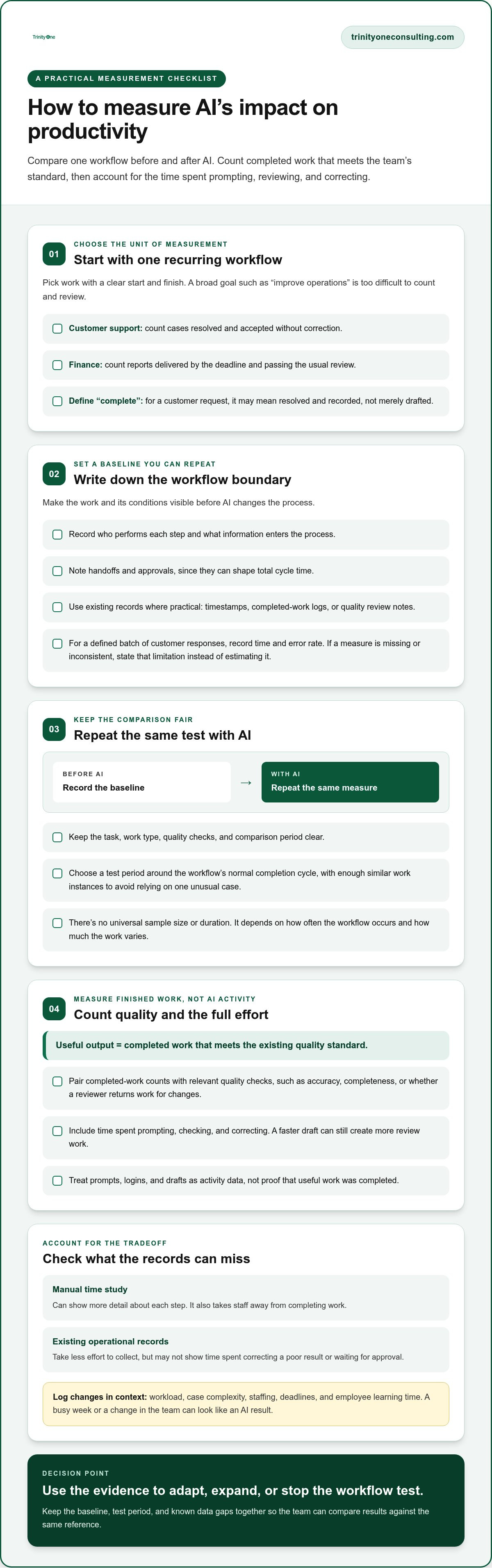
- Select one recurring workflow. Choose work with a clear start and finish, such as handling a customer request from receipt through resolution. Avoid starting with a broad department goal like “improve operations.” You need a process whose output can be counted and reviewed.
- Define the boundary. Write down who performs each step, what information enters the process, and what counts as complete. For a customer request, completion might mean the case is resolved and recorded, not simply that a response was drafted. Note handoffs and approvals too, since they can shape total cycle time.
- Record current performance. Use existing operational records where practical, such as timestamps, completed work logs, or quality review notes. Capture the same work type during the AI test. If a key measure is missing or inconsistent, state that limitation rather than filling the gap with an estimate.
Keep the record simple enough that staff can maintain it during normal work. A detailed manual time study may reveal more about each step, but it also takes people away from completing the work. Existing records cost less effort to collect, though they may not show time spent correcting a poor result or waiting for an approval. For teams that want expert support designing these tracking frameworks, data and analytics consulting firms such as Momentum One can help establish reliable operational metrics.
Comparable conditions matter. Record changes in workload, case complexity, staffing, deadlines, and employee learning time. If a new team member joins during the test, or a rush of unusual requests arrives, write it down. Those details help you distinguish an AI effect from a change in the work itself.
How do you choose a test period?
Set the period around the workflow’s normal completion cycle, then include enough similar work instances to avoid basing a decision on one unusual case. There’s no universal sample size or duration. Both depend on how often the workflow occurs and how much its work varies.
Research from MIT Sloan examines how task-level productivity gains may not carry through to final output. That’s why the baseline should track the work to completion, including review and correction, rather than measuring only the step where AI is used.
Before the test starts, I’d write down the baseline, the test period, and any known data gaps in one place. That gives the team a shared reference point and makes it harder to mistake a change in workload for a change in productivity.
Which metrics show whether AI improved productivity?
To measure the impact of AI on productivity, track more than speed. Cycle time shows how long work takes, while completed work shows how much reaches the finish line. Neither tells you whether the result meets the team’s standard or creates extra effort downstream.
A productivity claim needs an outcome measure and a quality check. Keep those measures tied to the workflow’s existing definition of “done.” For a report, that could mean delivered by the agreed deadline and accepted without avoidable corrections.
How should you compare speed, output, and quality?
Define cycle time from a consistent start to a consistent finish. If the clock starts when a request arrives, stop it when the work is accepted, not when an AI draft appears. Count completed work using the team’s current completion standard. Then track corrections or rework, since a faster first draft can still consume more review time.
| Measure | Definition | Data source | What it can miss |
|---|---|---|---|
| Cycle time | Elapsed time from workflow start to accepted finish | Workflow timestamps or work logs | Time spent checking, correcting, or waiting if those steps aren’t recorded |
| Completed work | Items finished under the team’s definition of done | Case, project, or production records | Differences in complexity or quality between items |
| Quality and rework | Errors, returned items, or corrections after initial completion | Existing review records or correction logs | Problems that aren’t reported or recorded |
| Employee experience | How AI affects task clarity, review burden, and time for higher-value work | Brief employee feedback during the test | Feedback can vary with workload and confidence using the tool |
How do you account for employee experience and hidden costs?
Ask employees whether the workflow feels clearer or harder to review, and whether saved time is going toward work the team values. Include training, checking, and exception handling in total task effort. Those minutes can erase an apparent speed gain, even when the AI-generated first pass looks good.
There’s a tradeoff. Detailed time tracking can expose hidden work, but it also adds reporting effort and may feel intrusive if it’s used to judge individuals. Keep the focus on the workflow and invite candid feedback. Employees often see review problems before they show up in a dashboard.
Productivity measures show what changed in the work. Financial return is a separate question, covered in “How to measure the actual ROI of AI implementation in your business.”
How do you compare AI results and decide what to change?
A useful way to measure the impact of AI on productivity is to compare the trial with the baseline using the same workflow definition, completion standard, and data collection method. Then inspect quality and rework before counting any time saved. Last, account for the effort involved in setup, training, review, and handling exceptions. If those steps add more work than the AI removes, the apparent gain may not hold.
How can you make the comparison more reliable?
Compare similar work handled with and without AI when that’s practical. A control group or phased rollout can help, but only if the work can be divided fairly without disrupting service or creating extra coordination. If that isn’t workable, compare consistent before-and-after periods and be candid about what the design can’t prove.
Keep a short record of factors that could affect the result. A seasonal rush, different case mix, staffing changes, or a redesigned approval step can change cycle time and completion rates independent of AI. Those factors don’t make the test useless. They do limit how confidently you can attribute a change to the tool.
For leadership visibility, add the result to an existing review rather than creating a separate reporting ritual. The guide “Automating Reporting for Leadership Teams: A Practical Guide” covers reporting cadence. Keep the AI test focused on whether this workflow produced more accepted work, with less total effort, under comparable conditions.
What should you do when productivity rises but quality falls?
Treat that result as a tradeoff, not a win. If the team completes more items but reviewers return more of them, identify where defects enter the process. Is AI generating incomplete drafts, are employees missing a review step, or are exceptions being pushed downstream? Adjust that part of the workflow and test again before expanding use.
Set decision rules before reviewing the results. For example, decide what evidence would justify continuing the test, what would call for changing the workflow, and what would mean stopping. Use the quality standard the team already follows, and agree on how much added review effort the process can absorb. That keeps the decision from shifting to fit a result leaders want to see.
A control group may strengthen the comparison, but it can cost time and coordination, and it may be impractical when the team shares work or volume is low. A phased rollout is easier to fit into operations, though changing conditions between phases can muddy the comparison. Choose the least disruptive method that gives you a fair read, then record its limits.
How do you make AI productivity measurement part of normal operations?
To make how to measure the impact of AI on productivity part of normal operations, assign an owner, bring the measures into an existing review, and record the same small set of signals each time. The work needs a steward after the initial test. Otherwise, the baseline gets stale and nobody acts when results change.
Who should own the measures and review?
Choose an operational owner who understands the workflow and can change how it runs. That person maintains the scorecard, checks whether the data is comparable, and brings a clear recommendation to the meeting. If that responsibility sits between roles, it tends to disappear. A fractional COO and Integrator can provide operational ownership and follow-through across that review process.
Include the people doing the work. Ask them to flag unclear instructions, extra checking, and cases where AI creates more effort than it removes. Their feedback gives leaders context that task-level numbers can miss. It also signals that measurement is meant to improve the workflow, not quietly grade individual employees.
Keep the scorecard short enough to review without turning the meeting into a data audit:
- Baseline: The original result for the defined workflow.
- Current result: The same measure from the latest review period.
- Quality signal: A relevant error, correction, or acceptance measure.
- Employee feedback: A brief note on added effort or time freed for valuable work.
Trinity Cadence brings operating cadence together with visibility into execution and engagement. That view complements workflow measures: completed work shows what moved, while engagement and employee feedback can surface strain that output counts won’t show on their own.
When should you expand, revise, or stop an AI use case?
Decide before the review what evidence would change your next move. Expand when the defined productivity result holds and quality and employee experience remain within standards your team can accept. Revise when the result is mixed but you can test a specific change, such as adding a review step or narrowing which tasks use AI.
Stop when the use case adds checking, correction, or employee burden without a clear operational benefit. That decision isn’t a failure. It’s a way to protect people’s time and keep effort focused on work that helps the business and its employees grow.
At each scheduled review, record the decision, the evidence behind it, and who owns the next action. This keeps the test connected to day-to-day operations and gives employees a clear way to see whether their feedback changed the process.
Put your AI measures to work in the next review
AI earns a place in your operation when it helps people complete more useful work without lowering quality or adding hidden effort. The practical answer to how to measure the impact of AI on productivity is to compare a defined workflow against a fair baseline, then review completed work alongside quality and employee feedback.
Keep the measure in regular operating reviews. Assign an owner who can explain what changed and act on the findings. A small scorecard makes it easier to spot whether results hold over time, or whether the workflow needs adjustment.
Trinity One’s founders bring over 30 years of operational experience. Trinity Cadence provides visibility into execution and engagement, giving leaders a view of how work is moving and how people are experiencing it. Both matter. Productivity should help your people do meaningful work, not leave them carrying the cost of a tool that hasn’t improved the process.
Start with one workflow, listen to the people doing the work, and let the evidence guide the next step. A measured approach gives your team room to improve with confidence.
Frequently Asked Questions
How do you measure the productivity of AI at work?
To measure the impact of AI on productivity, track a defined workflow from start to accepted finish, comparing useful completed work before and after AI is introduced. Record how long the work takes, how much meets the team’s completion standard, and whether quality changes. Include time spent prompting, checking, correcting, and handling exceptions. AI usage reports can show activity, but they can’t establish that the business completed more valuable work.
What metrics measure AI's impact on productivity?
Use measures that reflect the workflow: cycle time from a consistent start to finish, completed work under the team’s definition of done, and a quality signal such as returned items or corrections. Add employee feedback when AI changes task clarity or review effort. Each measure has limits. Cycle time can miss rework, and completion counts can hide differences in complexity, so interpret them together.
How do you measure AI productivity when there is no baseline?
Start by collecting current workflow data before changing the process. Use operational records such as completion timestamps and review notes where they’re reliable, and document any gaps. If AI is already in use, look for comparable historical records or a similar workflow without AI. Be clear about what the comparison can’t establish. A weak or incomplete baseline calls for cautious decisions, not invented precision.
Can AI save time without increasing productivity?
Yes. A task can take less time without producing more useful completed work. The minutes saved may be absorbed by waiting, approvals, extra review, or tasks that don’t affect the workflow’s main constraint. Track whether that time is actually redirected to valuable work or whether the same amount reaches completion. If overall output and quality remain unchanged, task-level time savings alone don’t show a productivity increase.
How do you measure AI's effect on work quality?
Use the quality checks your team already applies, then compare their results before and during the AI trial. Depending on the workflow, that may mean tracking errors, returned work, missing information, or corrections after review. Keep the definition consistent across both periods. Ask employees where defects or extra checking occur, since records may miss unreported fixes. Faster output with more rework is a tradeoff, not a clear gain.
How long should you test AI before measuring productivity?
Run the test long enough to cover the workflow’s normal completion cycle and observe a meaningful set of similar work instances. The right duration depends on how often the work occurs and how much it varies. A short test may be cheaper to run but can be distorted by unusual cases or staff learning time. Record those factors and avoid treating one early result as decisive.
What is the difference between AI productivity and AI ROI?
AI productivity measures changes in useful work completed, time, and quality within a workflow. AI return on investment (ROI) asks whether the financial value of those changes justifies the full cost of implementation and ongoing use. More completed work may improve productivity without creating financial return if costs are high or the extra output has little business value. Measure workflow outcomes first, then assess financial impact separately.