
A report that arrives after the decision is due is late, even if its dashboard updates in real time. Automating reporting for leadership teams works when shared metric definitions feed a dependable meeting rhythm, and each number has a named owner responsible for the next decision and follow-through. Otherwise, you’ve only made confusion arrive faster.
People can spend hours stitching spreadsheets together, only for leaders to debate which source is right. Automating those handoffs can reduce assembly work, but it won’t resolve conflicting definitions or make someone own a missed commitment. That takes an operating agreement, not another dashboard.
When comparing tools, consider how well each fits your existing data and who will maintain it as processes change. More automation can remove repetitive work, but it can also create another system to reconcile if definitions and ownership stay unclear. This guide explains how to connect metrics to decisions, compare reporting approaches, and set a rhythm your team can maintain. Trinity One’s practitioners bring more than 30 years of operational experience to the work of connecting reporting with clear ownership and follow-through.
Key Takeaways
- Start with a leadership decision, then define the measures and owners needed to support it.
- Before connecting data sources, agree on metric definitions and assign someone to check the data.
- Compare dashboards, scheduled reports, workflow automation, and AI summaries by the job each needs to perform and the review it requires.
- Pilot one recurring report and record preparation time and correction work before changing tools or expanding automation.
- When automating reporting for leadership teams, assess how the operating system connects execution visibility with employee engagement, review cadence, and follow-through.
What does automating reporting for leadership teams actually mean?
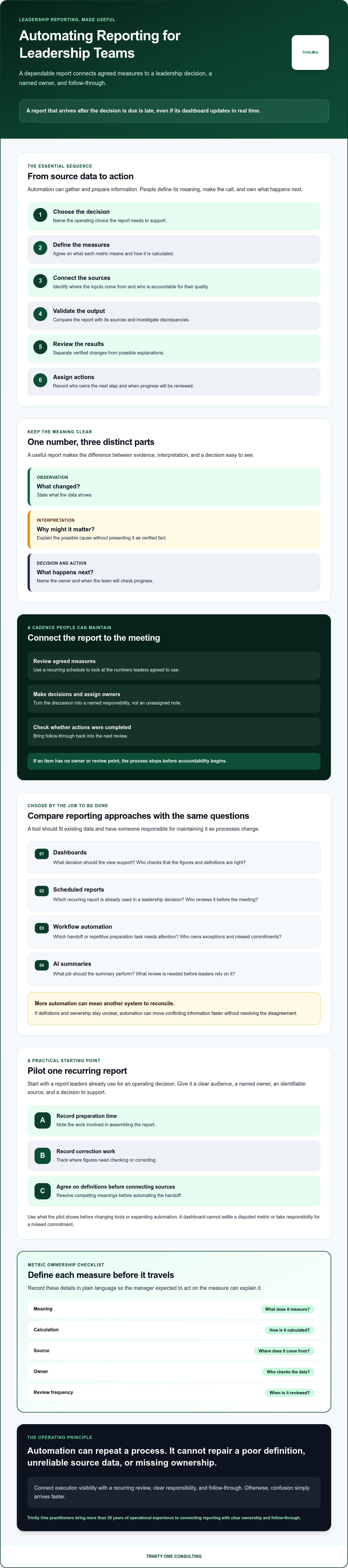
Automating reporting for leadership teams means creating a repeatable flow from source data to reviewed information and a leadership decision. The goal is a dependable input for action, not a bigger stack of charts. A report can save hours of copying figures and still leave the team unsure what to do next.
Think of the process in four stages. Data collection gathers information from its sources. Report preparation applies agreed definitions and presents the figures consistently. Interpretation explains what changed and why it matters. Action tracking records who will do what next and when the team will check progress.
Automation can handle recurring collection and preparation when the inputs and metric definitions are reliable. It can flag a threshold or display a change, but it can’t decide whether a delivery delay calls for a staffing adjustment or a customer conversation. That judgment belongs to people who understand the work. Automated reports also need setup and ongoing checks, and they won’t resolve unclear ownership or missing business context.
Leadership reporting serves the purpose of a Decision Support System (DSS), which helps people make decisions when a problem has structure but still requires judgment. The report supplies evidence. Leaders interpret it, make a call, and assign follow-through.
Which leadership reports are worth automating first?
Start with a recurring report leaders already use to make an operating decision, such as a weekly delivery review or cash review. Choose one with a clear audience, a named owner, an identifiable data source, and a decision the meeting needs to make. Automating a report no one uses adds maintenance without improving a decision.
Before building anything, document how the report is assembled and where corrections happen. If two teams define the same measure differently, agree on one definition before connecting the data. Otherwise, automation can reproduce disagreement faster and make it look more authoritative.
What should a useful leadership report answer?
A useful report separates what the data shows from what someone thinks it means and what they recommend doing. It should show what changed, what needs attention, and who owns the next action. Keep those distinctions visible: a variance is an observation, its cause is an interpretation, and the response is a decision.
A leadership reporting cadence is a recurring schedule for reviewing agreed measures, making decisions, assigning owners, and checking whether actions were completed. This keeps the report connected to the meeting and the meeting connected to follow-through. If an item has no owner or review point, the process stops before accountability begins.
How does automated leadership reporting work from source data to decisions?
Automating reporting for leadership teams works when each step has a clear owner, from choosing the decision to checking whether agreed actions happened. Software can move data and prepare a view. People still need to define what the numbers mean and decide how to respond.
- Choose the decision. Name the operating choice the report must support.
- Define the measures. Agree on what each metric means and how it’s calculated.
- Connect the sources. Identify where the inputs come from and who’s accountable for their quality.
- Validate the output. Compare the report with its sources and investigate discrepancies.
- Review the results. Separate verified changes from possible explanations.
- Assign actions. Record the owner and when progress will be reviewed.
Each step depends on the one before it. If departments define the same metric differently, combining their numbers creates a clean-looking report with a disputed meaning. If nobody owns the source, a broken or incomplete input can pass through without anyone noticing.
Automation cannot repair poor source data. It can repeat the same error on schedule.
How should teams define metrics before automating reports?
For every measure, record its meaning, calculation method, source, owner, and review frequency. Use plain language so the manager expected to act on it can explain it without translating technical terms. If two departments count the same thing differently, make the disagreement visible and resolve it before combining results.
A metric owner checks whether the input is complete and whether a reported change makes sense. That person doesn’t need to explain every business outcome alone. They do need to know who can confirm the source and resolve data questions before the report reaches the leadership meeting.
Where should human review remain in the reporting process?
Keep a person involved when a measure shifts unexpectedly, a source looks incomplete, or the report conflicts with what teams see in the work. For example, a sudden change in delivery status could reflect a real operational problem or an update entered late. The number signals where to look. It doesn’t prove the cause.
AI-generated summaries can point reviewers toward changes or questions, but treat an explanation as a prompt to check the source, not as a verified finding. Human review takes time, but it also gives someone a chance to catch a definition error or add context before leaders act on an unsupported conclusion.
Reporting works best when responsibility for the data and responsibility for the decision are both explicit. If either role is unclear, pause before expanding automation. Name an owner for the process and give that person authority to resolve questions about definitions, source quality, and follow-through.
How do dashboards, workflow automation, and AI reporting compare?
Each approach handles a different part of the reporting job. Dashboards display information. Scheduled reports deliver it on a set timetable. Workflow automation can route tasks and reminders. AI-generated summaries can help people scan information, but they still need review. When automating reporting for leadership teams, match the method to the decision and how often leaders need to make it.
| Approach | Best fit | Data discipline | Human review | Maintenance tradeoff |
|---|---|---|---|---|
| Dashboard | Shared visibility into stable measures | Metric definitions and sources must stay consistent | Leaders interpret changes and decide what to do | Needs upkeep when measures or source data change. A visible metric won’t assign an owner. |
| Scheduled report | Regular delivery of a fixed set of figures | Inputs and calculation rules need to be reliable | A person checks exceptions and explains their meaning | Less manual delivery, but a fixed format can miss a new question. |
| Workflow automation | Routing follow-up tasks or reminders after a trigger | Triggers, recipients, and ownership rules must be clear | A person handles exceptions and verifies completion | Rules need review as responsibilities and processes change. |
| AI-generated summary | Drafting a plain-language view of reported information | Source quality and metric definitions shape the output | A knowledgeable reviewer checks claims and context | Review, correction, and governance take staff time. AI can misread context or suggest a cause the data doesn’t prove. |
When is a dashboard enough for a leadership team?
A dashboard can be enough when leaders need a shared view of stable, well-defined measures and know where to discuss them. It’s a poor fit if people expect the screen to resolve disagreement or drive follow-through on its own. Someone still needs to interpret a change, make a decision, and take responsibility for the next step.
Scheduled reports suit teams that need the same information delivered at regular intervals. Workflow automation is useful when a defined event should prompt a task or reminder. Each added rule brings upkeep, so don’t automate a handoff until someone has agreed to own it. For teams relying on Microsoft ecosystems to track metrics, leveraging expert support such as Power BI danışmanlık hizmetleri can help ensure underlying data models and automated dashboards function reliably.
What can AI add, and what should it not decide?
AI can help draft a summary of reported patterns or prepare coaching prompts for a person to review. It can’t confirm why a metric changed, establish that a pattern is meaningful, or replace the leader accountable for a decision. Treat its output as a starting point. Check it against source records and the experience of people doing the work.
Compare options by the work they remove and the review they require. A scheduled report may take less staff time to maintain, while a more automated setup may reduce manual handoffs but require additional configuration, correction, and ongoing ownership. The best fit is one your team can maintain and use to make decisions at the pace the work requires.
How can you implement automated reporting without creating more work?
Automating reporting for leadership teams should begin with one recurring report, not a company-wide rebuild. A small pilot limits disruption and reveals where the process breaks. The tradeoff is that it takes longer to extend any benefits to other teams.
Before changing tools, document how the report works today. Record the time people spend collecting and preparing it, how often figures need correction, and what causes those corrections. This gives you a practical baseline to compare against, rather than relying on a promise made during a software demo.
How should you choose the first report to automate?
Choose a report with a known audience, a recurring deadline, and a clear decision it supports. A weekly operating review can be a sound candidate if leaders use its information to make a specific call. Don’t start with a report whose measures are disputed or whose owner is unclear. Automation will preserve those problems.
Map the current workflow before removing a step. Write down who gathers each input, where it comes from, who checks it, and how the finished report reaches its audience. This can reveal a handoff that exists for a reason, such as catching incomplete updates. Change that handoff only after someone agrees to own the check.
Test the new process with the same report and decision. Review the result with the people who prepare it and the leaders who use it. If the figures are wrong or the report arrives without enough context, correct the process before expanding it.
How can you tell whether reporting automation is working?
Compare actual preparation time and correction frequency with the baseline. Include the effort spent checking outputs and fixing errors. A report that takes less time to assemble but creates more correction work hasn’t delivered the improvement you expected.
Check what happens after leaders receive the report. Are decisions recorded? Does each action have an owner? Does the next review show whether that action moved forward? Delivery is only one measure of performance. The report earns its place when it supports decisions and follow-through.
If AI is part of the pilot, track the human time spent reviewing and correcting its output alongside any time it saves. This gives you a practical basis for assessing AI implementation ROI without treating an automated summary as proof of value. Keep a reviewer accountable for checking the meaning and context before leaders act.
Expand only when the first report is accurate, useful to its audience, and supported by a repeatable process with a named owner. Then apply what you learned to the next report. Each expansion adds maintenance, so keep checking whether the value justifies the work.
What should you evaluate in an operating system for leadership reporting?
When automating reporting for leadership teams, evaluate whether the operating system connects agreed measures to decisions, owners, and follow-up. Software can organize information, but it can’t take responsibility for the operating rhythm. Find out who maintains the system and what happens when its output is wrong.
Use these questions to assess a platform against the work your team needs it to support:
- Metric definitions: Can you document what each measure means, how it’s calculated, and who approves changes?
- Data access: Which existing sources can connect, and who can view or change the information? Verify every claimed integration against your actual requirements.
- Ownership: Who maintains definitions, permissions, and reporting workflows when responsibilities or processes change?
- Review cadence: Can leaders see when information is reviewed and where it fits into their operating meetings?
- Follow-up: Can the team identify who owns a decision or action and check its status at the next review?
Ask how the platform shows execution visibility and employee engagement. They answer different questions. Execution visibility concerns progress against commitments. Engagement concerns how people are experiencing their work. Treating one as a substitute for the other can hide important context, especially when a missed commitment needs a conversation, not just a status update. When teams need support navigating those human dynamics, consultancies like Humanise Solutions help nurture leadership and foster team excellence through targeted development programmes.
What should you ask before choosing a reporting platform?
Ask which of your data sources can be connected, then verify each claimed integration with the provider. Clarify who maintains metric definitions, access permissions, and reporting workflows after setup. If a summary looks inaccurate, find out how a leader or data owner can correct it and challenge its interpretation before it informs a decision.
Also ask what support is available when the team’s process changes. A platform may present information well and still leave you without an operating owner to resolve conflicting definitions or keep follow-through in the meeting rhythm. A related guide to business operating systems can help you assess the wider execution structure around the reporting tool.
When might an operating partner help?
If reporting has no clear owner, a fractional COO or Integrator can support operational ownership and execution. Trinity One’s practitioners bring more than 30 years of operational experience to this work. You can learn about fractional COO support.
Trinity Cadence may be worth considering if you’re evaluating an operating system that combines a unified operating cadence with AI coaching and provides real-time visibility into execution and engagement. Those capabilities don’t make the two forms of visibility interchangeable or remove the need for people to review information and own decisions. The fit depends on your operating needs and the support your team requires.
Book a discovery call with Kevin to discuss your leadership reporting needs.
Build a reporting rhythm leaders can act on
Automating reporting for leadership teams works when the report supports a decision, uses agreed definitions, and gives someone responsibility for what happens next. Start with one recurring report. Compare preparation time and correction work with your baseline, then check whether leaders assign actions and revisit them.
The right tool depends on the work. A dashboard can show measures, a workflow can route follow-up, and an AI summary can help people review information. None can replace human judgment or an operating owner. More automation can reduce manual assembly, but it also brings setup, review, and maintenance work.
Trinity Cadence provides a unified operating cadence, AI coaching, and real-time visibility into execution and engagement. Those are distinct signals, and leaders still need to interpret them and follow through. Trinity One also offers fractional COO and Integrator support to help manage operations and execution.
Build a reporting rhythm your team can maintain, one clear decision and accountable owner at a time.
Frequently Asked Questions
What is automated reporting for leadership teams?
Automated reporting for leadership teams is a repeatable process that moves information from its source into a checked report leaders use to make decisions. It can automate data collection and report preparation. People still need to interpret changes, decide what action fits, and track who owns it. A report that arrives on schedule but doesn’t inform a decision offers little operating value.
How do you automate reports for a leadership team?
Start with the decision the report must support, then agree on each measure’s meaning and source. Assign an owner to check the data, connect the sources, and test the report against original records. Set a review point for unexpected changes. Then record the decision, action owner, and follow-up date. Begin with one report your team already uses. Expanding before definitions and handoffs are clear can multiply corrections instead of reducing assembly work.
Can AI create leadership reports automatically?
Yes, AI can help prepare a leadership report by organizing supplied information and drafting a summary of changes. It may also suggest questions for a reviewer to investigate. But a generated explanation isn’t proof of cause. A responsible person should check the summary against source records and add business context before leaders act. Account for time spent reviewing and correcting AI output, especially if metric definitions or source records change.
Which metrics should leadership teams include in automated reports?
Include measures tied to a decision leaders need to make, not every figure a system can display. A delivery review might track commitments against completed work. A cash review might show the agreed cash measures leaders use to make operating decisions. The right measures depend on your company’s priorities and definitions. For each one, clarify what it means, where the data comes from, and who checks it.
Are dashboards enough for leadership reporting?
Dashboards can be enough when leaders need shared visibility into stable measures with agreed definitions. They’re less useful when the team expects a chart to explain why a number changed or assign follow-up. A dashboard displays information. Leaders still interpret it, make decisions, and name action owners. If the same report needs a fixed delivery time or reminders for follow-through, scheduled reporting or workflow automation may also be worth considering.
How can leadership teams keep automated reporting accurate?
Write down each metric’s definition, calculation, source, and accountable owner before connecting data. Have the owner compare report outputs with source records and investigate unexpected changes. Keep a way for leaders to flag an inaccurate summary or challenge its interpretation. Review definitions when processes change. These checks take staff time, but they help catch incorrect inputs and mistaken conclusions before those errors shape a leadership decision.
What should a leadership team automate first?
Choose a recurring report with a known audience, a clear deadline, and a specific decision it supports. A weekly delivery or cash review can be a candidate if leaders already use it. Avoid reports with disputed measures or unclear owners. Before changing tools, record the current steps, preparation time, handoffs, and correction work. That baseline helps your team judge whether automation reduces effort and supports action, not just whether the report arrives.