
AI workflow optimization for small business starts with a real process problem, not a new tool. If customer details are copied from an intake form into a spreadsheet and then entered again in your CRM, map that handoff first. Decide which step AI could prepare and which person will check exceptions.
Manual handoffs take staff time, and adding another app can create one more place to check. Improve the process, clarify decision rights, and involve the people doing the work before introducing AI. A narrow pilot still takes time to document and monitor, and it may show that AI is the wrong fit.
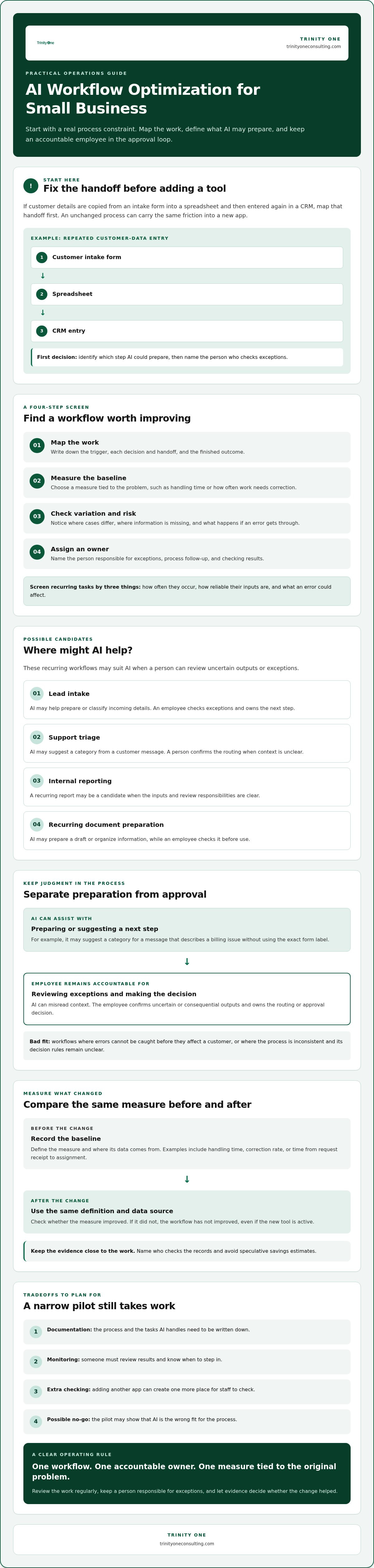
Choose one workflow with a visible starting point and finish. Keep an accountable employee in the approval loop, then compare a baseline, such as handling time or correction rate, with the same measure after the change. Avoid speculative savings estimates. Use evidence from the work itself.
The useful question is which workflow is holding up the day, and whether AI can reduce that friction without removing sound judgment. A clear owner and a regular review make the answer visible.
Key Takeaways
- AI workflow optimization for small business starts with fixing a real process constraint, not adding AI to an unchanged routine.
- Screen recurring tasks by how often they occur, how reliable their inputs are, and what happens if an error slips through.
- Lead intake, support triage, internal reporting, and recurring document preparation may suit AI when a person can review exceptions.
- Choose measures tied to the original problem, then compare before-and-after results using the same definitions and data sources.
- Keep the pilot narrow, name an owner, and document what AI handles so employees know when to step in.
What does AI workflow optimization for small business actually mean?
AI workflow optimization for small business means improving a repeatable process by using AI for defined tasks while people remain accountable for decisions and exceptions. A workflow is the sequence of inputs, decisions, handoffs, and outcomes that moves work from a trigger to a finished result. The goal is to remove friction from that sequence, not add a tool and leave the process unchanged.
For example, a customer request may arrive by email. Someone reads it, copies details into a system, decides who should handle it, and passes it along. Trace those steps before changing the process. A missed handoff may look like a technology problem when the real cause is unclear responsibility.
Business process automation (BPA) describes the broader use of technology to carry out business processes. Rules-based automation follows fixed instructions. AI can interpret variable inputs, such as customer messages phrased in different ways, but interpretation is not the same as authority to make every decision.
How is AI workflow optimization different from basic automation?
Basic automation works well when the trigger and next step are predictable. If a form’s service field says “billing,” a rule can send it to the billing queue. AI may help classify a message that describes a billing issue without using that exact label. It can handle variation, but a person should review uncertain or consequential outputs. That review takes staff time, and AI is a poor fit when errors cannot be caught before they affect a customer.
Hypothetical example: A small company receives service requests in a shared inbox. A rules-based setup routes messages based on a required form category. An AI-assisted setup could suggest a category from the message text, then leave an employee to confirm the assignment. The AI may reduce manual sorting, but it can misread context, so the employee still owns the routing decision.
Which small-business problems can a workflow change address?
Repeated entry can consume time when an employee copies the same customer details between systems. Slow routing can leave a request waiting in a shared inbox. Missing information can send work back to the customer for clarification. These are symptoms to investigate, not proof that AI is the answer.
Check the cause first. Repeated entry may come from disconnected records, while slow routing may stem from unclear ownership. If the process itself is inconsistent, AI can reproduce that inconsistency faster. Clarify the decision rules or handoff before adding a model.
Workflow optimization is a measurable improvement to how work moves from input to outcome, with a named owner accountable for the result. Choose a measure tied to the actual problem, such as the time from request receipt to assignment. If that measure doesn’t improve, the workflow hasn’t improved, even if the new tool is busy.
How do you find a small-business workflow worth improving?
For AI workflow optimization for small business, start with a recurring task that has a clear trigger and an observable outcome. A weekly expense review, for example, begins when an employee submits a report and ends when it’s approved or returned for correction. Pick one process and examine how it works today. Don’t start with the newest AI tool.
Use this four-step screen before changing the work:
- Map: Write down how the task moves from its trigger to its outcome, including each decision and handoff.
- Measure: Record a baseline that matches the problem, such as cycle time or how often a report needs correction.
- Assess variation: Note where cases differ, which details are often missing, and when someone must use judgment.
- Assign an owner: Name the person responsible for the process, exceptions, and follow-up after any change goes live.
What should you measure before changing the workflow?
Use a measure you can define and check consistently. For an approval process, that might be the time from submission to decision, or the share of reports returned because information was missing. Identify where each data point comes from, such as a submission timestamp or a correction log, and name who checks that the records are accurate.
A baseline comes before an ROI claim because you can’t credibly claim improvement without knowing what the process did before the change. The Small Business Administration’s guidance on AI can also inform your assessment of potential benefits and risks. It can’t tell you whether a specific workflow is ready. Your process records have to answer that.
When is a workflow not ready for AI?
Pause if nobody owns the outcome, employees follow different steps, key records are missing, or routine cases require frequent judgment calls. Those are signs that the process needs attention before a tool is added. Automating a broken process can move the same confusion faster and make errors harder to trace.
In those cases, document the steps and agree on who decides what before testing AI. That preparation costs staff time, and writing down the work won’t fix a bad policy by itself. It can, however, expose unclear handoffs and prevent avoidable rework. The owner can then judge whether AI has a defined task and decide what should happen when its output needs review.
The owner’s job continues after launch. They need authority to review exceptions, raise problems, and recommend pausing the change if the process gets worse. Set a regular check-in so the person doing the work can report what’s breaking and the owner can make a clear decision.
Which small-business workflows are practical candidates for AI?
AI workflow optimization for small business may fit when a task repeats, its inputs are usable, exceptions are manageable, and a person can catch an error before it causes harm. A high-volume task with incomplete records may be a poor candidate. So may a task where one mistaken decision could have serious consequences.
Compare those factors before choosing a tool. AI can assist with preparation and interpretation. People remain responsible for decisions that affect customers, money, or commitments.
- Lead intake: AI can summarize a new inquiry and suggest a category. An employee checks the details and decides where it goes. A vague request may be misclassified.
- Customer-support triage: AI can group incoming messages by topic and prepare a short summary. A support employee decides how to respond or escalate the issue. Sarcasm, urgency, or missing context may be missed.
- Internal reporting: AI can draft a narrative from approved records. A manager verifies the source figures and interpretation before sharing it. Out-of-date or inconsistent records can produce a polished but misleading report.
- Recurring document preparation: AI can prepare a first draft from approved details. The employee checks names, figures, and commitments before sending. Incorrect or invented details are a real failure mode.
Where can AI assist without owning the final decision?
Use AI to summarize incoming information before a person reviews and routes it, or to draft a first version that an employee checks before sending. The higher the consequence of an error, the stronger the review should be. A misrouted general inquiry may be easy to correct. A wrong figure in a customer-facing document needs careful checking before it leaves the business.
That review is operational work, not an optional final click. Name who checks the output and what they should do when it’s wrong. The tradeoff is employee time spent reviewing, and some tasks may not be worthwhile if review takes as long as doing them directly.
How should you compare tools and existing systems?
Check whether a candidate tool can work with your CRM or other system of record. Then account for setup, where information will move, what employees need to learn, and who will keep reviewing outputs. A tool that creates a second place to enter or verify data may add work instead of removing a handoff.
Keep the workflow visible in your operating cadence. The owner can bring exceptions and employee feedback into a regular review, then decide whether to adjust, continue, or stop the change. A tool can process tasks, but it can’t take responsibility for how the work affects your people or customers.
How do you measure results and keep an AI workflow accountable?
AI workflow optimization for small business needs a clear test: did the change improve the specific part of the operation that was causing friction? Compare the process before and after using the same definitions and data sources. A new tool’s activity count isn’t proof that customers are getting a better or faster result.
Which measures show whether an AI workflow is helping?
Match each measure to the original problem. If incoming requests sit too long before assignment, track the delay from receipt to routing. If employees keep correcting draft records, track the correction rate. If work stalls between teams, check whether each handoff reaches the next owner.
Keep the set small enough for the process owner to review consistently. Separate activity, such as summaries generated, from the outcome that matters, such as a completed handoff or a customer response sent. For an ROI assessment, count the full cost of the change: review time, exception handling, tool upkeep, and employee learning. A measured result can support a later ROI calculation, but an assumed time saving can’t.
Use the same source records and counting rules in both periods. If your baseline counts business days but your after-change measure counts calendar days, the comparison won’t tell you whether the workflow improved. Document the definitions before the pilot begins.
What should leaders review after deployment?
Name one process owner who can inspect output quality, unresolved exceptions, employee feedback, and shifts in workload. Put a regular review point on the operating cadence. The owner should be able to correct the process, ask for a change, or pause the AI-assisted step when the work no longer meets the agreed standard.
Set pause conditions before launch. For example, a person should take over if a required source detail is missing or an output could change a customer commitment. Keep the override simple and tell employees how to record the issue. Otherwise, exceptions can disappear into side conversations, leaving leaders with activity counts but no reliable account of failures.
Reporting should make those decisions visible, not bury them in a dashboard. In a leadership review, ask what changed, what failed, and who owns the next correction. That keeps the workflow tied to real operating conditions and gives employees a clear way to raise concerns.
How can a small business put AI workflow optimization into practice?
AI workflow optimization for small business works best as a limited pilot: one process, one accountable owner, and clear conditions for review or stopping. Keep the first test narrow enough that employees can see what changed and leaders can check whether the original problem improved. A pilot limits exposure, but it still takes staff time to prepare, review, and correct the work.
What belongs in a small-business AI pilot?
Write down the problem the pilot should address and the baseline you’ll compare against. Name the process owner, the person who reviews AI outputs, and the conditions that require a pause or human override. Test ordinary cases and exceptions before relying on the changed workflow in daily operations.
Document the current process and the proposed version. Be specific about which task AI handles, what information employees provide, and which decisions remain with a person. For example, if AI drafts a response to a customer request, the instructions should say who checks the draft and who approves it before it’s sent. Clear roles prevent “the system did it” from becoming an excuse when something goes wrong.
Use feedback from the people doing the work. They’ll notice when a step creates duplicate entry, sends an exception to the wrong person, or takes more review than the old process. Their observations matter. A pilot that ignores the people responsible for daily execution can look sound on paper and still fail in practice.
When can operational support help the implementation stick?
AI implementation involves more than selecting a tool. Priorities, employee responsibilities, existing systems, and follow-up all need an accountable operator. If the owner can’t resolve competing priorities or keep the workflow visible after launch, the pilot may remain an isolated experiment.
A fractional COO or Integrator can support workflow ownership and execution when your business needs operational leadership beyond tool setup. The right support should clarify who makes decisions and how the team will review results, not replace the employees who understand the work.
Once a change proves useful, bring it into the team’s operating cadence. Trinity Cadence provides a unified operating cadence, AI coaching, and real-time visibility into execution and engagement. A regular review rhythm can help keep ownership clear and surface issues as the work changes.
To discuss operational ownership or AI implementation for a workflow in your business, book a discovery call with Kevin.
Put one workflow under clear ownership
AI workflow optimization for small business starts with a specific operational problem, a process people can explain, and an owner who can tell whether the change is helping. Measure the work before and after using the same definitions. Keep a person responsible for decisions and exceptions.
A small pilot gives your team room to test ordinary cases and catch failures before relying on the changed process. It still takes staff time for setup, review, and learning. Count that work. If the pilot adds more checking than it removes, adjust the process or stop.
Once a change proves useful, make its owner and review part of your operating cadence. Trinity Cadence provides an operating cadence, AI coaching, and real-time visibility into execution and engagement. Trinity One also offers fractional COO and Integrator support for businesses that need operational ownership beyond tool setup.
People make the difference between a tool that runs and a workflow the team can trust. Give them clear responsibilities and a way to raise concerns as the work changes.
Book a discovery call with Kevin Patrick
Frequently Asked Questions
What is AI workflow optimization for a small business?
AI workflow optimization for a small business means improving a repeatable process by using AI for defined tasks while people remain responsible for decisions and exceptions. First, identify where work gets delayed, repeated, or corrected. Then decide whether AI can assist with that step and how an employee will check the result. Adding a tool without changing a flawed process can carry the same problem into a new system.
Can a small business use AI without hiring an AI specialist?
Yes, a small business can start with a clearly defined task and an employee who owns the process. For example, a team member might review AI-generated summaries before routing customer inquiries. The person needs clear instructions on what to check and when to take over. More complex connections between systems or bespoke software requirements may call for outside AI implementation agencies like 4mation or operational support. Don’t assume a tool can set its own limits.
Which small-business workflows are best suited to AI?
Look at recurring work with usable inputs, manageable exceptions, and errors a person can catch before they affect a customer or business decision. Lead intake summaries, customer-support triage, internal report drafts, and recurring document preparation may be candidates. AI can prepare or categorize information, while an employee checks the output and owns the next decision. A task with unreliable records or frequent judgment calls may need process changes first.
How do I know if a workflow is ready for AI automation?
A workflow is more ready when employees can explain its trigger, steps, decision points, and intended outcome. You should know who owns it, where its records come from, and how exceptions are handled. If staff follow different procedures or key information is often missing, document and clarify the process first. That preparation takes time, but it can prevent a tool from repeating confusion or adding another handoff.
What happens if an AI workflow gives a wrong answer?
A named employee should review the output, correct it, and follow a defined escalation or pause process. Set the rules before launch. For example, an AI-drafted customer response should stay in draft until an employee verifies the details and approves sending it. Record recurring errors so the process owner can decide whether to adjust the instructions, change the workflow, or stop using AI for that task.
How much time does it take to implement AI in a small business?
There’s no reliable timeline without knowing the workflow, the tools already in use, and how clearly the steps are documented. A limited pilot still takes staff time to map the process, check inputs, test ordinary cases and exceptions, and train employees on review responsibilities. Connections between existing systems may add work. Set a scope and review point before starting rather than assuming implementation ends when the tool is switched on.
How can a small business measure AI workflow ROI?
Compare a consistent baseline with results after the change. Choose measures tied to the original problem, such as response delay, correction frequency, or completed handoffs. Include the time employees spend reviewing outputs, handling exceptions, maintaining the tool, and learning the new process. Separate measured outcomes from assumed savings. If the process improves but adds more review work, include that tradeoff before deciding whether the change is worthwhile.